 Guille Ojeda
Caylent Catalysts™
Generative AI Strategy
Accelerate your generative AI initiatives with ideation sessions for use case prioritization, foundation model selection, and an assessment of your data landscape and organizational readiness.
Learn how to build an agentic workflow on AWS, leveraging Amazon Bedrock’s multi-agent collaboration features.
In our earlier article we explored the concept of agents and agentic workflows, and the advantages of designing your AI application as an agentic workflow. We discussed planning considerations and available tools, with a focus on what AWS provides, both via Bedrock and SageMaker. Now it's time to get building.
This article will outline the steps involved in building an agentic workflow on AWS. We'll focus on leveraging Amazon Bedrock's multi-agent collaboration capability, which allows a "supervisor" agent to orchestrate a team of specialized "collaborator" agents. And once you have your first agentic workflow, we'll discuss where to go next.
Let's get started. Here's what a typical process looks like:
The initial phase involves creating the individual AI agents that will form your system. This includes the central orchestrator (the supervisor agent) and the task-specific specialist agents (collaborators).
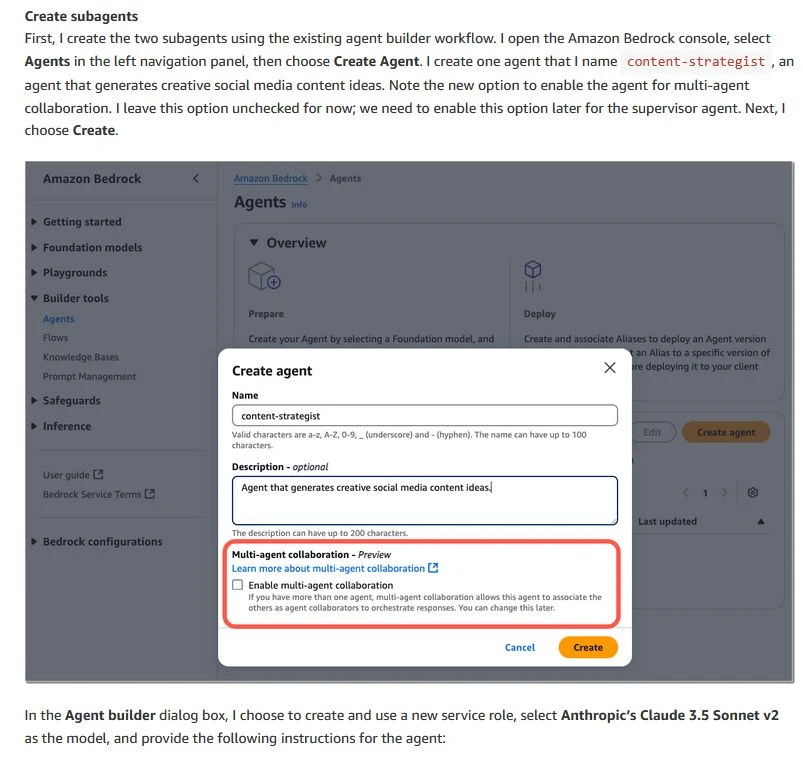
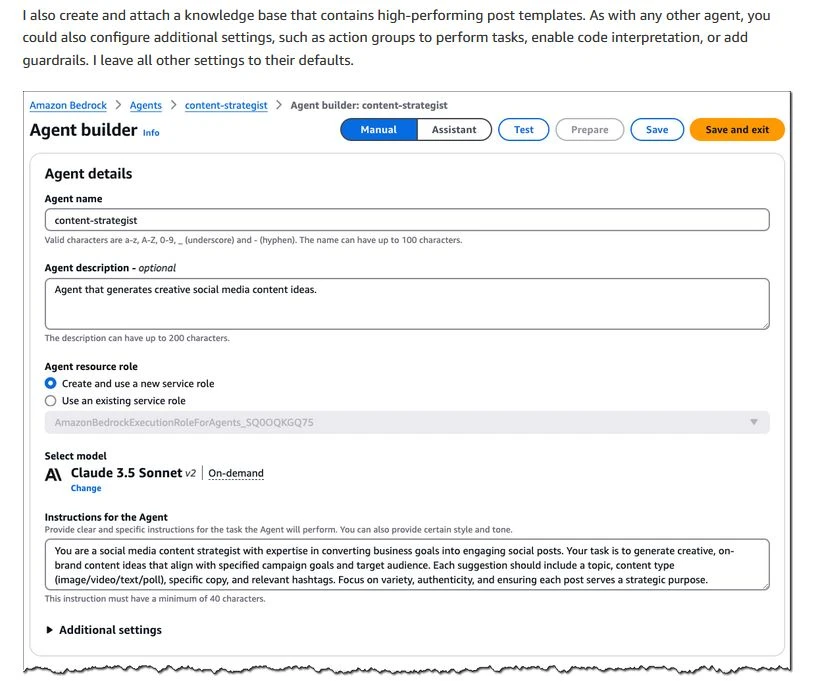
Specialist agents often need to interact with external systems or access specific knowledge to perform their tasks. This is enabled via Action Groups and Knowledge Bases.
Action Groups: These define the tools or APIs the agent can use to perform actions and interact with external systems (e.g., databases, CRM systems, booking APIs, or other enterprise applications).
Knowledge Bases: These enable agents to perform Retrieval Augmented Generation (RAG) by connecting them to relevant, often proprietary, data sources, grounding their responses in factual information.
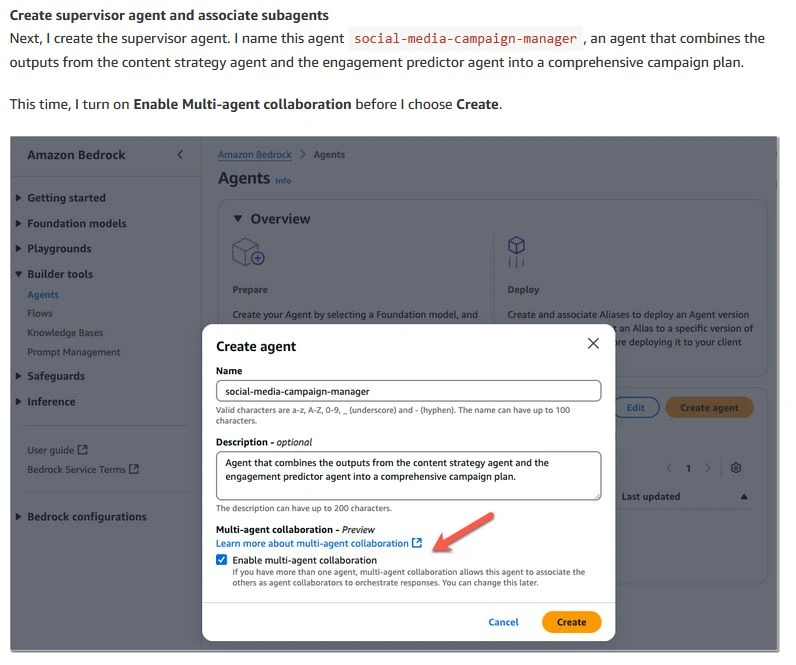
The supervisor agent is the central coordinator of the multi-agent system.
Role: It typically interacts directly with the user or the calling application. Its primary responsibilities are to understand the overall request, decompose it into sub-tasks if necessary, delegate these sub-tasks to the appropriate specialist agents, and synthesize their outputs into a final response or plan.
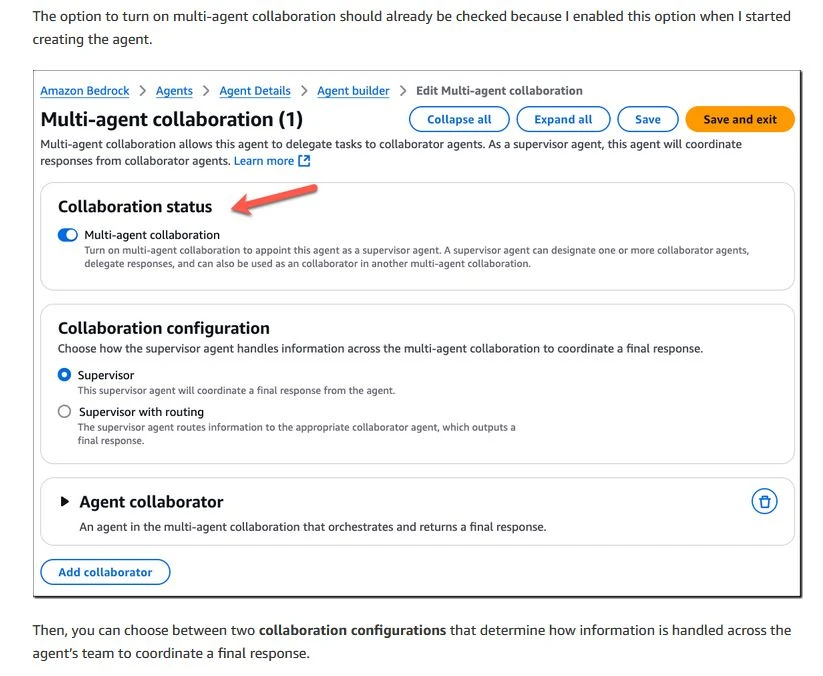
Collaboration Configuration: After creating the supervisor agent (similar to specialist agents, but with orchestration-focused instructions), navigate to its multi-agent collaboration settings within the Amazon Bedrock console. Here, you will:
The overall architecture and behavior of the multi-agent system are determined by how the supervisor agent is configured to interact with and utilize the specialist agents.
Finally, when moving towards more structured deployments, consider Bedrock's features for lifecycle management. You can create immutable, numbered versions of your agent. An alias (e.g., prod, dev) then points to a specific version. This allows for strategies like blue/green deployments. Before a version can be active, the agent configuration must be validated and compiled using the PrepareAgent API call or console action. This MLOps-like approach, often combined with Infrastructure as Code (IaC) tools like AWS CloudFormation or AWS CDK, provides a robust framework for managing and deploying agentic workflows.
Understanding the mechanics of planning, tooling, and building agentic workflows is the first step. The next, and arguably more significant phase, is strategically applying these powerful capabilities to drive tangible business value. Agentic AI opens a vast world of possibilities for application development, but realizing that potential requires careful alignment with organizational goals and an awareness of potential challenges.
While AWS tools like Amazon Bedrock and Amazon SageMaker significantly streamline the development process for agentic AI, the design of workflows that truly drive value remains a nuanced challenge. It's not enough to simply connect models; the architecture must be purposeful and grounded in clear business objectives. Challenges like ensuring reliability and consistency from probabilistic FMs, managing inter-agent dependencies, and maintaining data quality for RAG systems require careful planning and robust design.
Agentic workflows can automate intricate processes, enhance decision-making with AI-driven insights, create highly personalized user experiences, and unlock new operational efficiencies. However, making the most of these technologies requires careful strategization. This involves:
The true power of agentic workflows on AWS is unlocked when they are deeply integrated with your organization's unique data, systems, and processes. This allows agents to operate with relevant context and execute tasks directly within your existing enterprise environment, transforming them from generic AI tools into highly valuable, specialized assistants.
Navigating the complexities of agentic AI, from initial strategy through robust implementation and ongoing optimization, can be a significant undertaking. The challenges of designing effective multi-agent collaboration, ensuring data security and governance, managing costs, and debugging intricate interactions require specialized expertise. Caylent's teams of experts are dedicated to helping organizations like yours plan and implement effective agentic AI pipelines on AWS.
As an AWS Premier Services Partner with deep expertise in generative AI, Caylent can effectively guide you through the agentic development process, leveraging the full potential of AI agents. We help ensure that your agentic workflows are not just technologically impressive but are also strategically aligned with your organization’s core objectives, delivering the maximum possible value. Our approach focuses on building solutions that are scalable, secure, and cost-effective, enabling you to confidently adopt these transformative technologies.
You can explore our generative AI offerings further at Caylent Generative AI on AWS and learn about our strategic approach through initiatives like the AWS Generative AI Strategy Catalyst. Caylent’s guidance ensures that your investment in agentic AI translates into meaningful business outcomes, helping you overcome the inherent challenges and harness the full power of these advanced systems.

Guille Ojeda is a Principal Innovation Architect at Caylent, a speaker, author, and content creator. He has published 2 books, over 200 blog articles, and writes a free newsletter called Simple AWS with more than 45,000 subscribers. He's spoken at multiple AWS Summits and other events, and was recognized as AWS Builder of the Year in 2025.
View Guille's articlesCaylent Catalysts™
Accelerate your generative AI initiatives with ideation sessions for use case prioritization, foundation model selection, and an assessment of your data landscape and organizational readiness.
Caylent Catalysts™
Accelerate investment and mitigate risk when developing generative AI solutions.
Leveraging our accelerators and technical experience
Browse GenAI Offerings
Explore what’s new in Claude Haiku 5.5, including what's improved, where Haiku fits alongside the latest Sonnet, Opus, and Fable models, and what has changed in pricing, API behavior, and safeguards.
Explore what’s new in Claude Sonnet 5.5, including its improvements, where it fits alongside other Claude models, and what organizations should know before migrating.
