 Trek10 Team
How and When to Use Amazon EventBridge Pipes
Learn when Amazon EventBridge Pipes can replace simple AWS Lambda connector functions and when they fall short. Includes practical guidance on InputTemplates and data transformation.
Managed Services
IoT
Explore how serverless architectures power IoT applications — from event‑driven design and scalability to AWS services like Lambda, IoT Core, and real‑time processing — for efficient, reliable connected systems.
Learn when Amazon EventBridge Pipes can replace simple AWS Lambda connector functions and when they fall short. Includes practical guidance on InputTemplates and data transformation.
Build a serverless data warehouse on AWS by streaming Amazon DynamoDB data to Amazon S3 with AWS Lambda. A cost-effective architecture for historical analytics and business reporting.
Scale Amazon Kinesis Data Streams with low-cardinality partition keys using UpdateShardCount, manual shard splitting, and explicit hash values to balance traffic across shards.

Founded in 2013, Trek10 helped organizations migrate to and maximize the value of AWS by designing, building, and supporting cloud-native workloads with deep technical expertise. In 2025, Trek10 joined Caylent, forming one of the most comprehensive AWS-only partners in the ecosystem, delivering end-to-end services across strategy, migration and modernization, product innovation, and managed services.
View Trek10's articlesThis blog was originally written and published by Trek10, which is now part of Caylent.
Serverless on AWS represents a new way to architect highly performant, highly resilient, and very low-maintenance cloud-native systems. In this occasional series, we’re going to review some interesting design patterns for serverless systems on AWS. Hopefully this will give you an idea of what you can build and you can apply these concepts to your own use case. Some of the most interesting serverless architectures combine several of these patterns into a single system.
One of the most compelling solutions that is enabled by assembling Lambda with other AWS Platform (or “Serverless”) services is IoT. At Trek10 we are leading the way in building massively scalable IoT back-ends with AWS Serverless. Fundamentally what we’re talking about here is two-way communication with a “thing” or smart device. This could be a consumer product, instrumentation on industrial equipment, or a hobbyist maker kit. AWS lists some good starter kits here.
Two way communication means sending data to the thing (i.e. a command to change a setting) and receiving data back from it (i.e. a sensor readings).
For this post, we’ll focus on thing communication. The service that enables this is called AWS IoT Core. There are many other components to a complete solution, which I’ll revisit and review at the end.
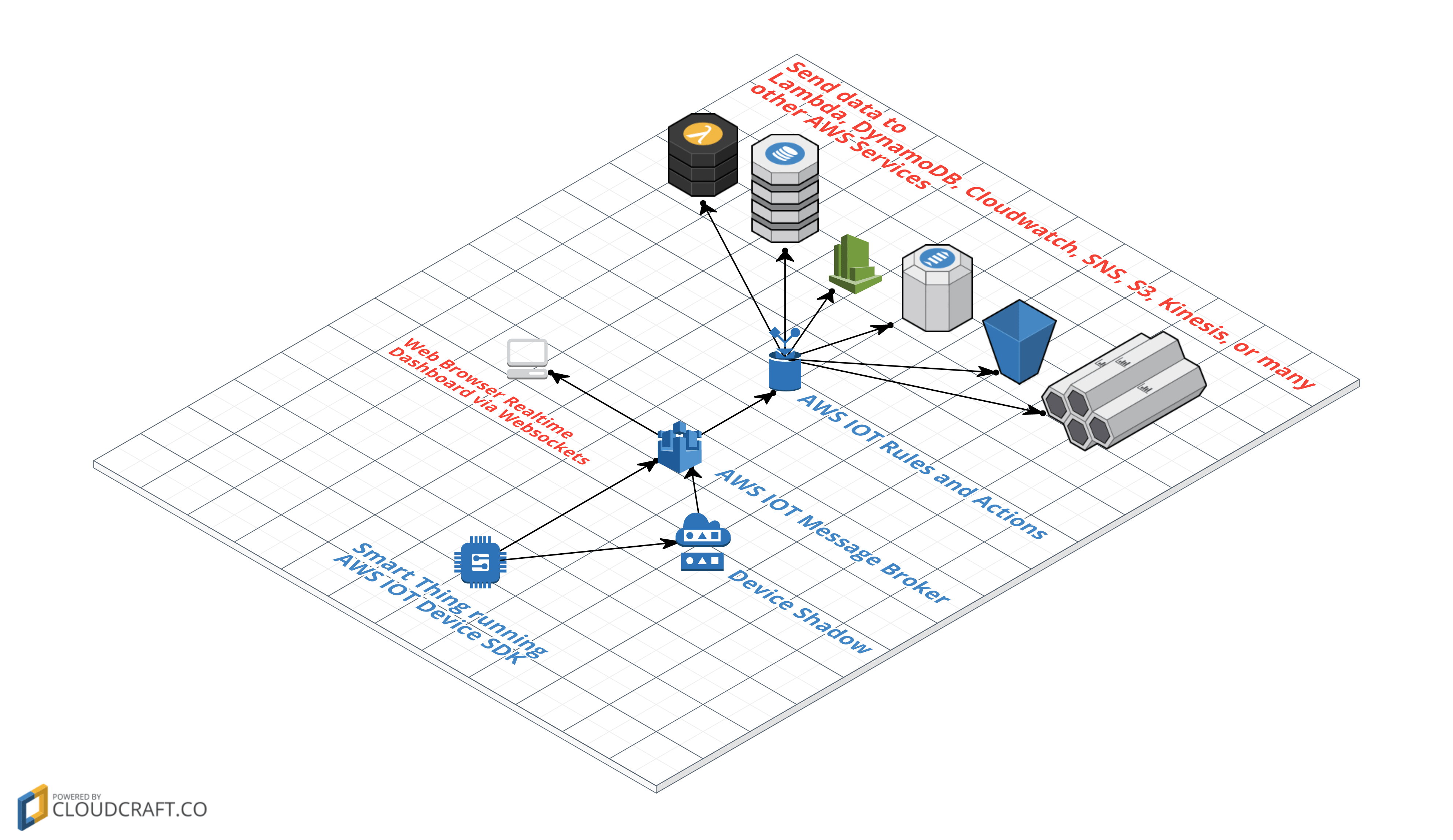
So how does this work? Let’s start with sending data from the thing to your back-end. For example, maybe you want your smart beer keg to send flow data back to your database and real-time dashboard!
It starts by using the AWS IoT Device SDK, using either MQTT or HTTP, to publish data from the device to AWS IoT Core. (Or if you want a full OS for your device, Amazon FreeRTOS comes ready to connect to AWS IoT as well.) AWS IoT Core includes a message broker (which is more or less invisible to you, no servers involved) that supports these two protocols. MQTT is a great protocol for IoT but sometimes HTTP is just more convenient. (Websockets is also supported, which we’ll discuss later.)
Your thing can send the message directly with an arbitrary topic name, or you can optionally update the thing “shadow”. The shadow is a component of AWS IoT Core which allows you to store state information about your thing and allow your thing and your back-end to asynchronously communicate about that state. The AWS IoT Device SDK makes it easy for a device to update its shadow. This link is a good primer on AWS IoT device shadows.
Whether via the shadow or some other topic, the message will hit the AWS IoT Core message broker. From there, IoT Rules and IoT Rule Actions take over. IoT Rules use a simplified SQL syntax to select data out of the message and optionally test for some condition (using a WHERE clause) and then triggering an IoT Rule Action. The SQL syntax is a bit limited but there are many built-in functions that extend its functionality.
IoT Rule Actions are triggered by rules and let you invoke a variety of AWS services and pass some data from the thing’s message to that service. Perhaps most commonly, you would trigger a Lambda function. But as you can see from the above diagrams, you can do a lot of other interesting things like send the data to Kinesis, CloudWatch, SNS, or even write directly to DynamoDB, S3, or ElasticSearch. One other interesting option is the Salesforce action… right from IoT Core, you can write data to Salesforce to, for example, trigger customer serivce followup actions in Salesforce when a device sends an error code. The full list of available IoT Rule Actions is here.
Another interesting option: a browser real-time dashboard can also subscribe to updates with MQTT-over-websockets, another protocol supported by AWS IoT. The result here is remarkably low latency… data sent from the thing shows up in the browser fast enough that the perception is completely “immediate”. This SDK for Javascript provides a starting point.
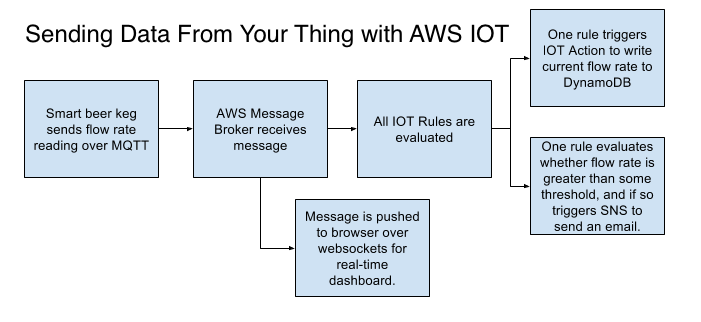
So to summarize, a typical flow might be something like this:
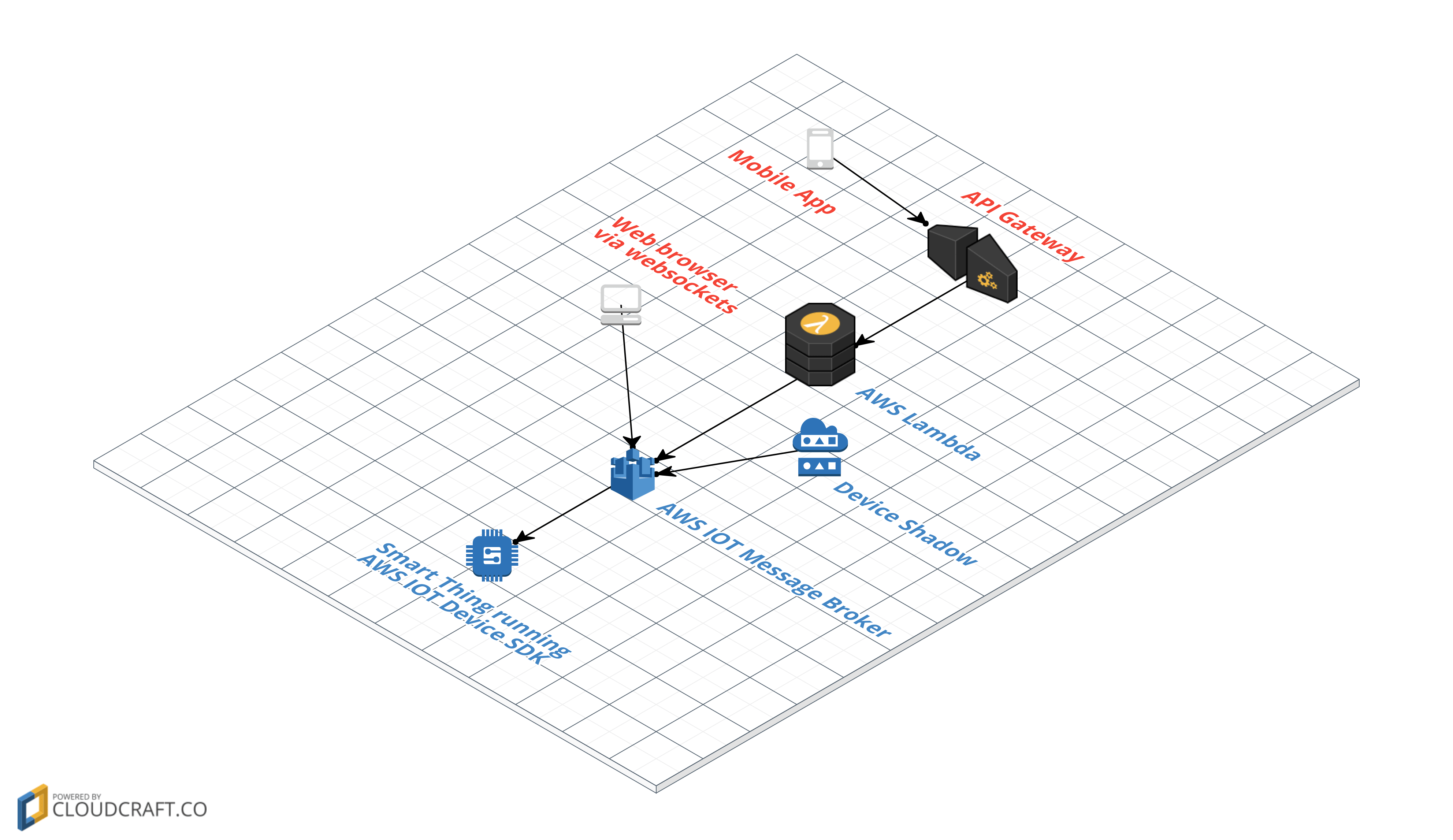
Sending data to your thing (typically commands like changing a setting) is simpler. With the AWS IoT Device SDK, your thing can easily subscribe to MQTT updates of the thing shadow and other MQTT topics and take some on-device action when receiving those updates, for example turn on your smart light bulb when you receive an update to the shadow with the attribute “state”: “on”. So on the back end, all you need is a something to write the message.
To keep things completely serverless, we want our writers to be Lambda functions. Like any Lambda function, it can be triggered from a variety of events. Most commonly this would be API Gateway, which would give your mobile or web app the ability to hit an API to update some thing setting. But you could also trigger this Lambda function from, say, a CloudWatch alarm or an S3 event.
Websockets are another interesting option for sending data. For a real-time user experience, you could connect your web or mobile app over websockets to AWS IoT and publish a message over websockets to control your device.
Thing communication is a great start but only the beginning. For a complete solution, some of the things to consider include:
The best way to start learning about AWS IoT is to get hands-on. There are a lot of great tutorials in AWS’s documentation. A fun & simple way to get started is the AWS IoT Button (a generalized version of the Amazon Dash Button ) or AWS IoT One-Click. With both of these, you basically have a simple way of sending a message into AWS IoT so you can hook it up to a Lambda function for a simple demonstration.
If you want to get a little deeper, try one of the AWS IoT Starter Kits. Even if you aren’t in the business of IoT, dabbling with AWS IoT is a great way to extend your knowledge about the AWS platform services that make up “Serverless”. Pulling these services together to build your Smart Beer Keg or whatever hobby idea you have in mind will help you start to really appreciate the power of these services to build arbitrarily complex enterprise-level solutions. If you need some support with your IoT initiative contact us to discuss how we can help.

Caylent Services
Reliably Operate and Optimize Your AWS Environment
Caylent Services
Quickly establish an AWS presence that meets technical security framework guidance by establishing automated guardrails that ensure your environments remain compliant.