 Kevin Nha
Caylent Catalysts™
Generative AI Strategy
Accelerate your generative AI initiatives with ideation sessions for use case prioritization, foundation model selection, and an assessment of your data landscape and organizational readiness.
Learn how to build and deploy a secure, scalable RAG chatbot using Amazon Bedrock AgentCore Runtime, Terraform, and managed AWS services.
As AI rapidly moves from experimentation to production, teams face an increasing number of architectural decisions that directly shape long-term outcomes. While most decisions are reversible "two-way doors" open to iteration, your infrastructure choice is a one-way door that defines how far your application can scale, how securely it operates, and how reliably it serves users. Enter Amazon Bedrock AgentCore, AWS's new foundation for building and deploying intelligent agents at production scale.
Before diving in, it’s worth clarifying an important distinction: Amazon Bedrock AgentCore is not responsible for your agent’s orchestration or business logic. Instead, it provides the managed runtime infrastructure that executes that logic – handling scaling, isolation, networking, and security so you can focus on how your agent thinks and behaves.
In this hands-on guide, we'll deploy an AI agent to AgentCore Runtime to orchestrate a Retrieval-Augmented Generation (RAG) chatbot workflow with user authentication and streamed responses. This hands-on example will illustrate core architectural concepts for building and operating AI agents on AWS, highlighting several important considerations:
Along the way, we'll also explore the trade-offs involved in architectural decisions for production-level chatbots.
Amazon Bedrock AgentCore is an agentic platform for building, deploying, and operating AI agents securely at scale across any framework, model, or protocol, with no infrastructure management required. Its modular services include Runtime, Memory, Gateway, Identity, Browser, and Observability, which you can use together or independently for your agent workloads.
At the heart of this platform is AgentCore Runtime, a secure, serverless execution environment purpose-built to host and scale AI agents and tools without requiring the provisioning or tuning of compute resources.
AgentCore Runtime’s serverless model lets you focus on your agent’s logic instead of infrastructure. There is no need to configure auto-scaling groups, monitor CPU or memory metrics, or reserve capacity in advance. The service automatically scales based on load, provides session isolation and extended runtimes, and abstracts away the undifferentiated heavy lifting of agent hosting.
You also pay only for the active resources you consume. Idle time spent waiting for large language model responses or external context retrieval is not counted toward the final cost. Compared with services that charge for pre-allocated resources, such as Amazon EC2 or Amazon ECS, this model can significantly reduce overall CPU costs for agent-based applications.
Beyond AgentCore Runtime, Amazon Bedrock AgentCore offers several other services that can facilitate AI agent development and integrate with AgentCore Runtime, such as:
If you are using Amazon Cognito User Pools to authenticate users, you can integrate JWT Token Authentication to secure your application. Learn more about Amazon Bedrock AgentCore here.
Production RAG systems must support reliable semantic search, frequent document updates, and secure access to knowledge sources, while keeping operational complexity low. The vector store should scale with growing data volumes without requiring ongoing infrastructure management.
For this implementation, we're using Amazon Bedrock Knowledge Base with Amazon S3 Vectors as the vector store. This combination offers several advantages:
To perform the type of semantic search required for RAG, we first use a specialized model to compute vector embeddings for the documents we want to retrieve, and then store those embeddings in a vector database. These embeddings allow user queries to be compared based on meaning rather than exact keyword matches.
Amazon Titan Text Embeddings is AWS’s native embedding model family designed for high-quality semantic retrieval across a wide range of text workloads. For this implementation, we’re using Amazon Titan Text Embeddings V2 due to its improved retrieval performance, larger token input size of up to 8,192 tokens, and lower cost compared to alternatives such as Cohere’s embedding models.
Amazon Bedrock Knowledge Base offers multiple chunking strategies, including standard, hierarchical, semantic, and multimodal.
For RAG applications, semantic chunking is typically the best fit. Instead of splitting documents based on layout or fixed token counts, it groups content by meaning, which improves retrieval accuracy and helps ensure the model receives context that is actually relevant to the user’s question. This deeper semantic alignment is especially important for conversational workloads, and it’s why AWS recommends semantic chunking as the default approach for RAG-based chatbots.
Anthropic Claude Haiku 4.5 is a lightweight, high-performance foundation model designed for low-latency, cost-efficient conversational and agentic workloads. It strikes a strong balance between speed, reasoning capability, and operational cost, making it well-suited for production chatbot deployments.
We're using Anthropic Claude Haiku 4.5 as the foundation model because it delivers near-frontier performance at a fraction of the cost of larger models like Sonnet. It performs particularly well for chatbots that require fast responses, reliable reasoning, and consistent use of agentic tools. To learn more, read about our deep dive into Claude Haiku 4.5.
Future Considerations: As LLM models evolve, you may need to update your model to leverage improved reasoning, higher-quality training data, and better tool-use capabilities.
To deploy your AI agent, you'll need:
Clone the repository: https://github.com/caylent/agentcore-blog.
This tutorial creates resources in us-east-1 to leverage Bedrock Data Automation.
The main entry point for the agent invocation is agent/app.py:
The agent accepts a payload with user input and conversation history:
Agent orchestration logic defines how the agent reasons about user input, selects tools, and determines when to retrieve external knowledge. This logic is implemented entirely within the application code and is not managed by Amazon Bedrock AgentCore. AgentCore provides the execution environment for the agent, but the orchestration flow remains your responsibility.
In this implementation, the agent decides whether to call the knowledge base retriever tool or respond directly. This decision is guided by system prompts defined in agent/prompts.py:
agent/RetrieverTool.py) is invoked with an LLM-generated query. Retrieved documents are added as context for the final response.The orchestration graph is defined in agent/RetrieverAgent.py:
Step 1: Initialize Configuration
Fill out the values in terraform.tfvars:
Step 2: Initialize Terraform
This initializes:
The repository includes two sample documents at kb/. Upload these to an Amazon S3 bucket, then update terraform.tfvars:
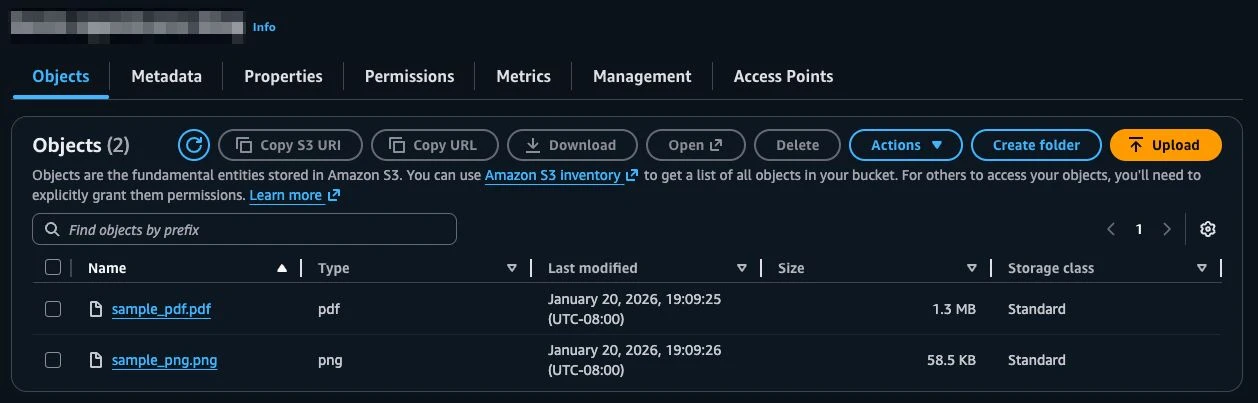
Now you are ready to deploy the infrastructure to AWS:
Defines the knowledge base, data source, and Amazon S3 vector index:
Note: The data source uses the awscc provider to support Amazon Bedrock Data Automation for multimodal parsing.
Creates an Amazon Cognito user pool and client for Amazon Bedrock AgentCore Runtime authorization.
First, create an Amazon ECR repository and push an initial image:
Then define the AgentCore Runtime:
Key configuration points:
latest Amazon ECR image tag1. Navigate to the created user pool in AWS Console
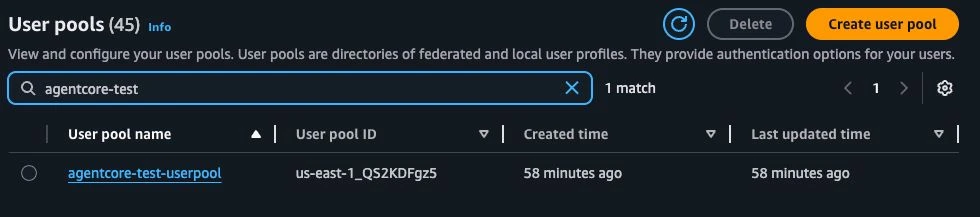
2. Go to Users under User Management
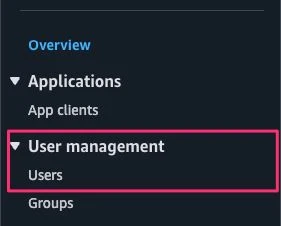
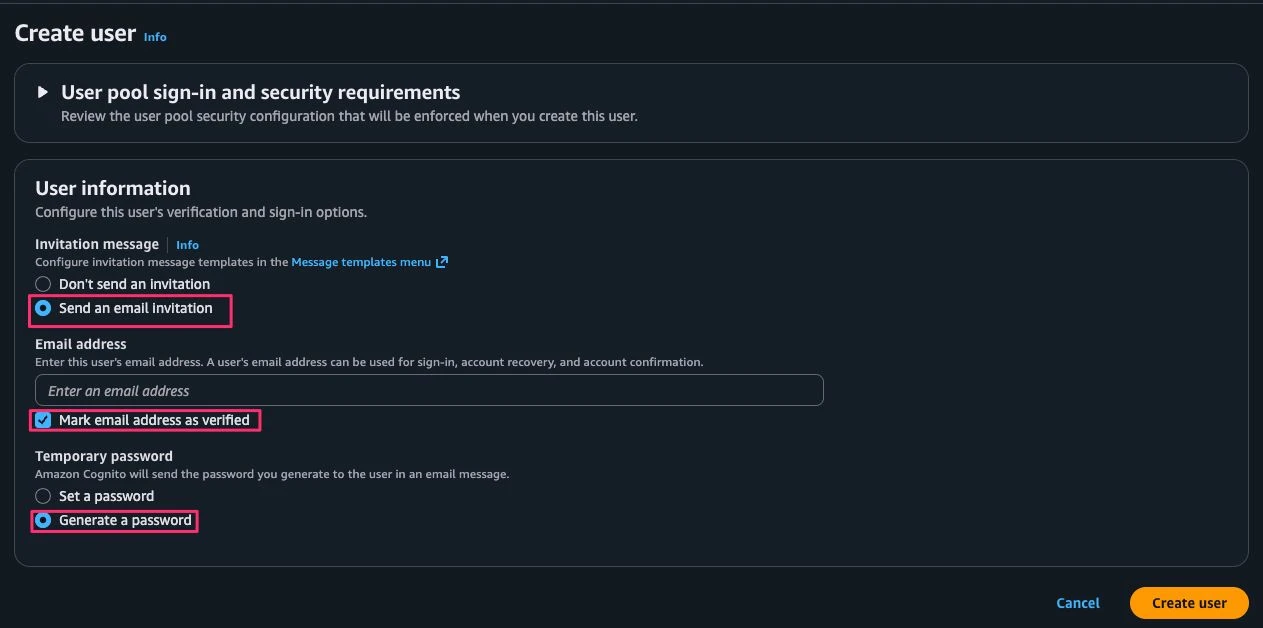
3. Create a user with the highlighted options and enter the email address of the user to invite
4. User receives email with subject "Your temporary password" from “no-reply” containing username and temporary password
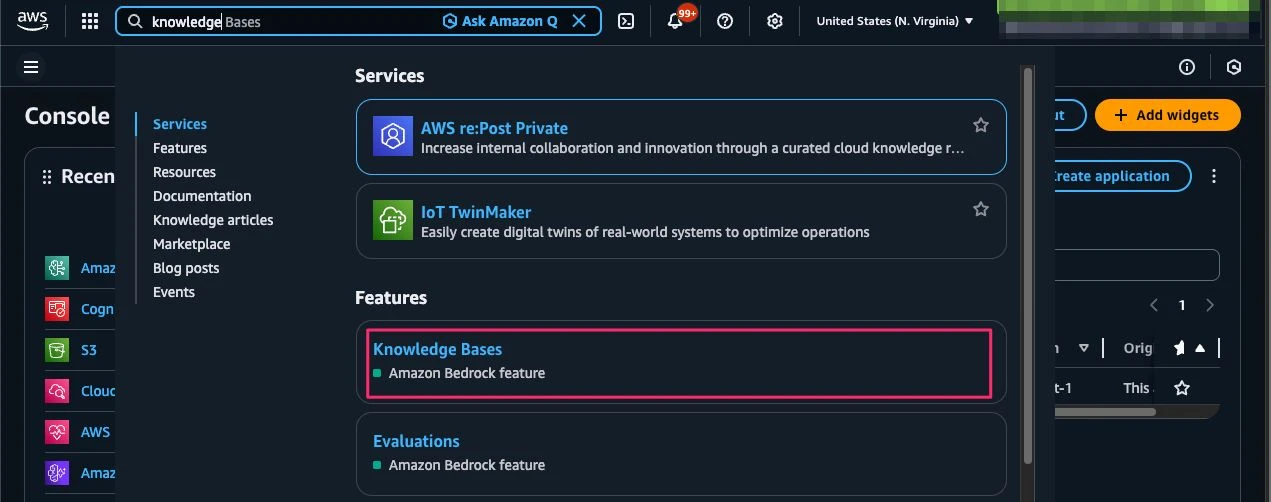
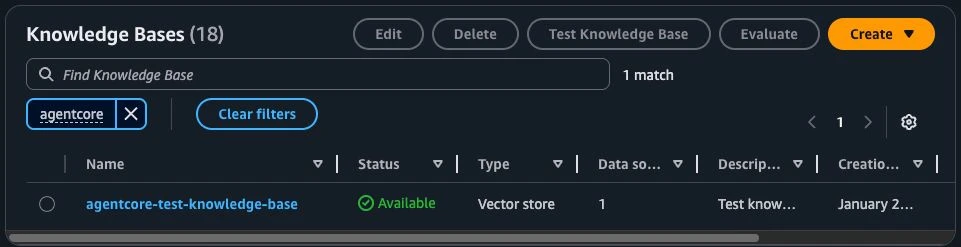
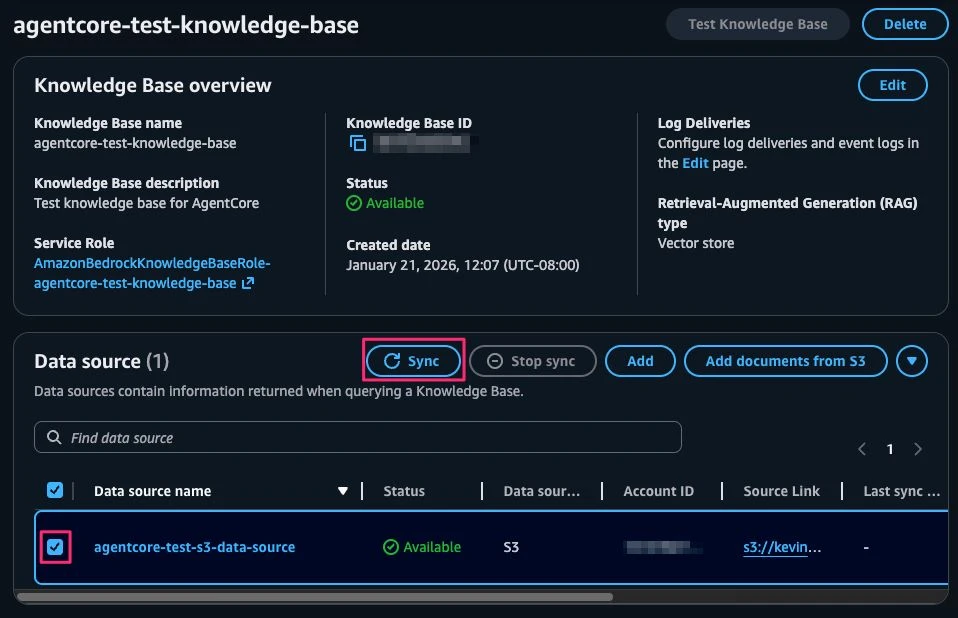
1. Navigate to the created knowledge base
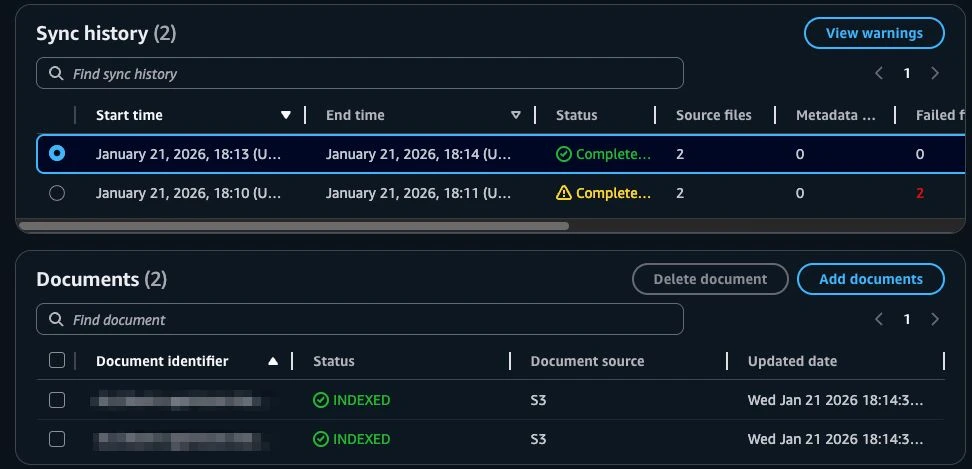
2. Select the data source and Sync to ingest documents
Run the provided script to upload agent code to ECR (scripts/upload-agent-to-ecr.sh):
Response:
Copy the Session value and update the password:
Response includes AccessToken:
To reauthenticate, just run the initiate-auth shell command again with the new password.
Copy the AccessToken for authenticating our requests to AgentCore Runtime. We can now make a request to the AgentCore Runtime:
Important Notes:
X-Amzn-Bedrock-AgentCore-Runtime-Session-Id must be at least 33 characters, since it identifies the session (each unique session gets its own dedicated microVM)Streamed Response:
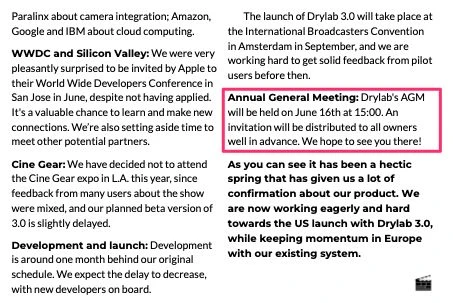
Now let’s ask a question about what’s in the knowledge base, about Drylab News, and their next AGM.
Response:
The agent successfully retrieves and synthesizes information from the knowledge base!
Let’s also test it on the image file added to the data source:
Response:
The agent successfully extracts and summarizes information from image-based documents, demonstrating Amazon Bedrock Data Automation's multimodal capabilities.

And that’s it! You now have a fully functional RAG application with streaming capabilities and secured with Amazon Cognito.
To destroy all resources created during this hands up:
When deploying the application for the first time, you may encounter a few common issues related to AWS configuration, permissions, or service access. The following troubleshooting tips address the most common issues encountered during setup.
Addressing these issues typically resolves the majority of deployment errors and allows the agent to start successfully.
You've successfully built and deployed a RAG application using Amazon AgentCore Runtime. This implementation demonstrates several key capabilities commonly used in real-world agent architectures:
To take this further, consider extending the implementation with:
Amazon AgentCore provides a flexible foundation for building and scaling AI agents. By combining serverless execution, managed AI services, and infrastructure-as-code practices, this approach provides a practical reference for teams looking to move beyond simple prototypes as requirements evolve.
Building a production-ready agentic application requires more than standing up infrastructure; it demands the right architectural decisions, security posture, and cost controls from day one. Caylent brings deep AWS expertise and hands-on experience with Amazon Bedrock AgentCore to help organizations design, build, and scale secure AI applications with confidence. From RAG architectures and multimodal knowledge bases to authentication, observability, and infrastructure as code, our teams partner with you to move beyond POCs and deliver AI systems that are ready for real users, real traffic, and real business impact. Get in touch today to get started.

Kevin is a Cloud Software Architect in the Cloud Native Applications practice at Caylent. He has built many solutions using TypeScript, Python, and Java, and has in-depth experience with building serverless applications on AWS. Having previously worked at Amazon, Kevin has an in-depth understanding of AWS technologies and closely works within the Leadership Principles. He enjoys building and rebuilding applications in the AWS ecosystem and helping clients build cloud-native applications.
View Kevin's articlesCaylent Catalysts™
Accelerate your generative AI initiatives with ideation sessions for use case prioritization, foundation model selection, and an assessment of your data landscape and organizational readiness.
Caylent Catalysts™
Accelerate investment and mitigate risk when developing generative AI solutions.
Leveraging our accelerators and technical experience
Browse GenAI Offerings
Explore what’s new in Claude Haiku 5.5, including what's improved, where Haiku fits alongside the latest Sonnet, Opus, and Fable models, and what has changed in pricing, API behavior, and safeguards.
Explore what’s new in Claude Sonnet 5.5, including its improvements, where it fits alongside other Claude models, and what organizations should know before migrating.
@app.entrypoint
def invoke_agent(payload):
    ...
    try:
        for chunk, metadata in agent.stream(
            initial_state,
            stream_mode="messages",
        ):
            if metadata.get("langgraph_node") == "generate_answer":
                yield from __process_stream_chunk(chunk)
    except Exception as exc:
        app.logger.error("Streaming agent response failed")
        yield {
            "type": "error",
            "text": "Something went wrong while streaming the response.",
            "error_details": str(exc),
        }
        return
{
    "prompt": "Hello!",
    "conversation_history": []
}
class RetrieverAgent:
   ...
   def get_agent_graph(self):
        workflow = StateGraph(AgentState)

        workflow.add_node("generate_query", self.__generate_query)
        workflow.add_node("retrieve", ToolNode([knowledge_base_retriever]))
        workflow.add_node("generate_answer", self.__generate_answer)

        workflow.add_edge(START, "generate_query")
        workflow.add_conditional_edges(
            "generate_query",
            tools_condition,
            {
                "tools": "retrieve",
                END: "generate_answer",
            },
        )
        workflow.add_edge("retrieve", "generate_answer")
        workflow.add_edge("generate_answer", END)

        return workflow.compile()
cp infra/example.tfvars infra/terraform.tfvars
# infra/terraform.tfvars

region  = "us-east-1"
profile = "" # AWS profile name from 'aws configure sso', leave empty for env variables
tags = {
  project = "agentcore-test"
}
ecr_repository_name = "" # unique name for the ecr repository
...
cd infra
terraform init
# infra/providers.tf
terraform {
required_version = ">= 1.14.3"
required_providers {
aws = {
source = "hashicorp/aws"
version = ">= 6.28.0"
}
awscc = {
source = "hashicorp/awscc"
version = ">= 1.68.0"
}
}
}
# infra/terraform.tfvars
...
data_source_bucket_arn   = "arn:aws:s3:::<name-of-your-s3-bucket>"
terraform plan # Verify configuration
terraform apply # Approve deployment
...

resource "aws_s3vectors_vector_bucket" "vector_bucket" {
  vector_bucket_name = "agentcore-test-vector-bucket"
}

resource "aws_s3vectors_index" "vector_index" {
  index_name         = "agentcore-test-vector-index"
  vector_bucket_name = aws_s3vectors_vector_bucket.vector_bucket.vector_bucket_name

  data_type       = "float32"
  dimension       = 1024
  distance_metric = "euclidean"

  metadata_configuration {
    non_filterable_metadata_keys = [
      "AMAZON_BEDROCK_TEXT",
      "AMAZON_BEDROCK_METADATA"
    ]
  }
}

resource "aws_s3_bucket" "multimodal_output_bucket" {
  bucket = "agentcore-test-multimodal-output-bucket"
  force_destroy = true
}

resource "aws_bedrockagent_knowledge_base" "knowledge_base" {
  name        = "agentcore-test-knowledge-base"
  description = "Test knowledge base for AgentCore"
  role_arn    = aws_iam_role.bedrock_kb_role.arn
  knowledge_base_configuration {
    type = "VECTOR"
    vector_knowledge_base_configuration {
      embedding_model_arn = "arn:aws:bedrock:${var.region}::foundation-model/amazon.titan-embed-text-v2:0"
      embedding_model_configuration {
        bedrock_embedding_model_configuration {
          dimensions          = 1024
          embedding_data_type = "FLOAT32"
        }
      }
      supplemental_data_storage_configuration {
        storage_location {
          type = "S3"

          s3_location {
            uri = "s3://${aws_s3_bucket.multimodal_output_bucket.bucket}"
          }
        }
      }
    }
  }
  storage_configuration {
    type = "S3_VECTORS"
    s3_vectors_configuration {
      index_arn = aws_s3vectors_index.vector_index.index_arn

    }
  }
}

resource "awscc_bedrock_data_source" "s3_data_source" {
  knowledge_base_id = aws_bedrockagent_knowledge_base.knowledge_base.id
  name              = "agentcore-test-s3-data-source"
  description       = "Data source for the Amazon Bedrock Knowledge Base: agentcore-test-knowledge-base from S3 with semantic chunking"
  data_source_configuration = {
    s3_configuration = {
      bucket_arn = var.data_source_bucket_arn
    }
    type = "S3"
  }
  vector_ingestion_configuration = {
    chunking_configuration = {
      chunking_strategy = "SEMANTIC"
      semantic_chunking_configuration = {
        breakpoint_percentile_threshold = 95
        buffer_size                     = 0 # either 0 or 1
        max_tokens                      = 300
      }
    }
    parsing_configuration = {
      parsing_strategy = "BEDROCK_DATA_AUTOMATION"
      bedrock_data_automation_configuration = {
        parsing_modality = "MULTIMODAL"
      }
    }
  }
}
resource "aws_ecr_repository" "agentcore_runtime_agent_code_ecr_repository" {
  name         = "agentcore-test-runtime-agent-code-ecr-repository"
  force_delete = true
}

resource "null_resource" "push_initial_image" {
  depends_on = [aws_ecr_repository.agentcore_runtime_agent_code_ecr_repository]

  triggers = {
    repository_url = aws_ecr_repository.agentcore_runtime_agent_code_ecr_repository.repository_url
    region         = var.region
  }

  provisioner "local-exec" {
    command = <<-EOT
      # Check if image exists, if not push alpine:latest as placeholder
      ...
    EOT
  }
}
...
...

resource "aws_bedrockagentcore_agent_runtime" "agentcore_runtime" {
  agent_runtime_name = "agentcore_test_runtime"
  description        = "Agentcore runtime for the agentcore-test application"
  role_arn           = aws_iam_role.agentcore_runtime_role.arn
  protocol_configuration {
    server_protocol = "HTTP"
  }

  environment_variables = {
    BEDROCK_KNOWLEDGE_BASE_ID = aws_bedrockagent_knowledge_base.knowledge_base.id
  }

  authorizer_configuration {
    custom_jwt_authorizer {
      discovery_url   = "https://cognito-idp.${var.region}.amazonaws.com/${aws_cognito_user_pool.userpool.id}/.well-known/openid-configuration"
      allowed_clients = [aws_cognito_user_pool_client.userpool_client.id]
    }
  }

  agent_runtime_artifact {
    container_configuration {
      container_uri = "${aws_ecr_repository.agentcore_runtime_agent_code_ecr_repository.repository_url}:latest"
    }
  }

  network_configuration {
    network_mode = "PUBLIC"
  }

  depends_on = [null_resource.push_initial_image]
}
cd ../ # go back to root of project if necessary
cp scripts/env.agent.template scripts/.env.agent # make sure ECR repopsitory matches Terraform output
scripts/upload-agent-to-ecr.sh
aws cognito-idp initiate-auth \
--auth-flow USER_PASSWORD_AUTH \
--client-id <user-pool-client-id> \
--auth-parameters USERNAME=<email>,PASSWORD=<tempPassword>
{
    "ChallengeName": "NEW_PASSWORD_REQUIRED",
    "Session": "AYABeMpHy...",
    "ChallengeParameters": {
        "USER_ID_FOR_SRP": "...",
        "requiredAttributes": "[]",
        "userAttributes": "{\"email_verified\":\"true\",\"email\":\"...\"}"
    }
}
aws cognito-idp respond-to-auth-challenge \
  --region us-east-1 \
  --client-id <user-pool-client-id> \
  --challenge-name NEW_PASSWORD_REQUIRED \
  --session "<SESSION_FROM_PREVIOUS_CALL>" \
  --challenge-responses \
      USERNAME=<email>,NEW_PASSWORD=<newPassword>
{
    "ChallengeParameters": {},
    "AuthenticationResult": {
        "AccessToken": "eyJra...",
        "ExpiresIn": 86400,
        "TokenType": "Bearer",
        "RefreshToken": "eyJjd...",
        "IdToken": "eyJra..."
    }
}
curl -X POST \
"https://bedrock-agentcore.us-east-1.amazonaws.com/runtimes/arn%3Aaws%3Abedrock-agentcore%3Aus-east-1%3A<ACCOUNT_ID>%3Aruntime%2F<AGENTCORE_RUNTIME_ID>/invocations?qualifier=DEFAULT" \
  -H "Authorization: Bearer <TOKEN>" \
  -H "Content-Type: application/json" \
  -H "X-Amzn-Bedrock-AgentCore-Runtime-Session-Id: session-5123123141231555555555555555555555214124215552" \
  -d '{"prompt": "Hello", "conversation_history": []}'
data: {"type": "text", "text": "Hey"}
data: {"type": "text", "text": " there! "}
data: {"type": "text", "text": "👋 Welcome"}
data: {"type": "text", "text": "!"}
data: {"type": "text", "text": " How"}
data: {"type": "text", "text": " can I help you today?"}
data: {"type": "text", "text": " Feel"}
data: {"type": "text", "text": " free to ask me anything –"}
data: {"type": "text", "text": " I"}
data: {"type": "text", "text": "'m here to assist!"}
curl -X POST \
"https://bedrock-agentcore.us-east-1.amazonaws.com/runtimes/arn%3Aaws%3Abedrock-agentcore%3Aus-east-1%3A<ACCOUNT_ID>%3Aruntime%2F<AGENTCORE_RUNTIME_ID>/invocations?qualifier=DEFAULT" \
  -H "Authorization: Bearer <TOKEN>" \
  -H "Content-Type: application/json" \
  -H "X-Amzn-Bedrock-AgentCore-Runtime-Session-Id: session-5123123141231555555555555555555555214124215552" \
  -d '{"prompt": "When is the next AGM for Drylab news?",  "conversation_history": []}'
data: {"type": "text", "text": "According"}
data: {"type": "text", "text": " to the"}
data: {"type": "text", "text": " Drylab News"}
data: {"type": "text", "text": " newsletter"}
data: {"type": "text", "text": " from"}
data: {"type": "text", "text": " May"}
data: {"type": "text", "text": " 2017"}
data: {"type": "text", "text": ", the next Annual"}
data: {"type": "text", "text": " General Meeting (AGM) was"}
data: {"type": "text", "text": " scheduled for **June"}
data: {"type": "text", "text": " 16"}
data: {"type": "text", "text": "th"}
data: {"type": "text", "text": " at"}
data: {"type": "text", "text": " 15"}
data: {"type": "text", "text": ":00**"}
data: {"type": "text", "text": " (3:00 PM)."}
data: {"type": "text", "text": " An"}
data: {"type": "text", "text": " invitation"}
data: {"type": "text", "text": " was to"}
data: {"type": "text", "text": " be distribute"}
data: {"type": "text", "text": "d to all owners"}
data: {"type": "text", "text": " in"}
data: {"type": "text", "text": " advance"}
data: {"type": "text", "text": "."}
curl -X POST \
"https://bedrock-agentcore.us-east-1.amazonaws.com/runtimes/arn%3Aaws%3Abedrock-agentcore%3Aus-east-1%3A<ACCOUNT_ID>%3Aruntime%2F<AGENTCORE_RUNTIME_ID>/invocations?qualifier=DEFAULT" \
  -H "Authorization: Bearer <TOKEN>" \
  -H "Content-Type: application/json" \
  -H "X-Amzn-Bedrock-AgentCore-Runtime-Session-Id: session-5123123141231555555555555555555555214124215552" \
  -d '{"prompt": "In one sentence tell me about the method of the placebo effect experiment", "conversation_history": []}'
data: {"type": "text", "text": "The experiment"}
data: {"type": "text", "text": " teste"}
data: {"type": "text", "text": "d the placebo effect by having"}
data: {"type": "text", "text": " Par"}
data: {"type": "text", "text": "kinson's Disease"}
data: {"type": "text", "text": " patients receive treatments"}
data: {"type": "text", "text": " describe"}
data: {"type": "text", "text": "d as co"}
data: {"type": "text", "text": "sting $100"}
data: {"type": "text", "text": " an"}
data: {"type": "text", "text": "d then"}
data: {"type": "text", "text": " $"}
data: {"type": "text", "text": "1"}
data: {"type": "text", "text": "500"}
data: {"type": "text", "text": ","}
data: {"type": "text", "text": " measuring"}
data: {"type": "text", "text": " changes in their motor"}
data: {"type": "text", "text": " function"}
data: {"type": "text", "text": " after"}
data: {"type": "text", "text": " each"}
data: {"type": "text", "text": " administration"}
cd infra
terraform destory # yes
