 Trek10 Team
Caylent Services
Cloud Operations & Managed Services
Reliably Operate and Optimize Your AWS Environment
Learn how Datadog Event Mapping works — how to correlate logs, events, and alerts into meaningful context, improve observability, and reduce noise so your team can quickly detect and respond to issues.
This blog was originally written and published by Trek10, which is now part of Caylent.
Datadog’s Event Stream centralizes events from a variety of sources into a single thread. You can easy search & filter your stream, graph/dashboard events, overlay events on time series graphs, and create alerts off of events. You can insert your own custom events into the stream from several sources, including the API, emails, Amazon SNS topics, or a variety of other pre-built integrations. This has almost endless useful applications. For example, you might want to overlay your deployment events over your system performance metrics, or put every auto-scaling failure event into the stream and alert if you get more than a few in some time window.
In an AWS-heavy environment, events via SNS are particularly useful. There are a bunch of events that AWS can send to an SNS topic that might be useful to have in the Datadog Event Stream, including:
There’s a problem with this. Here’s how a raw SNS message looks when it comes into the Datadog Event Stream:
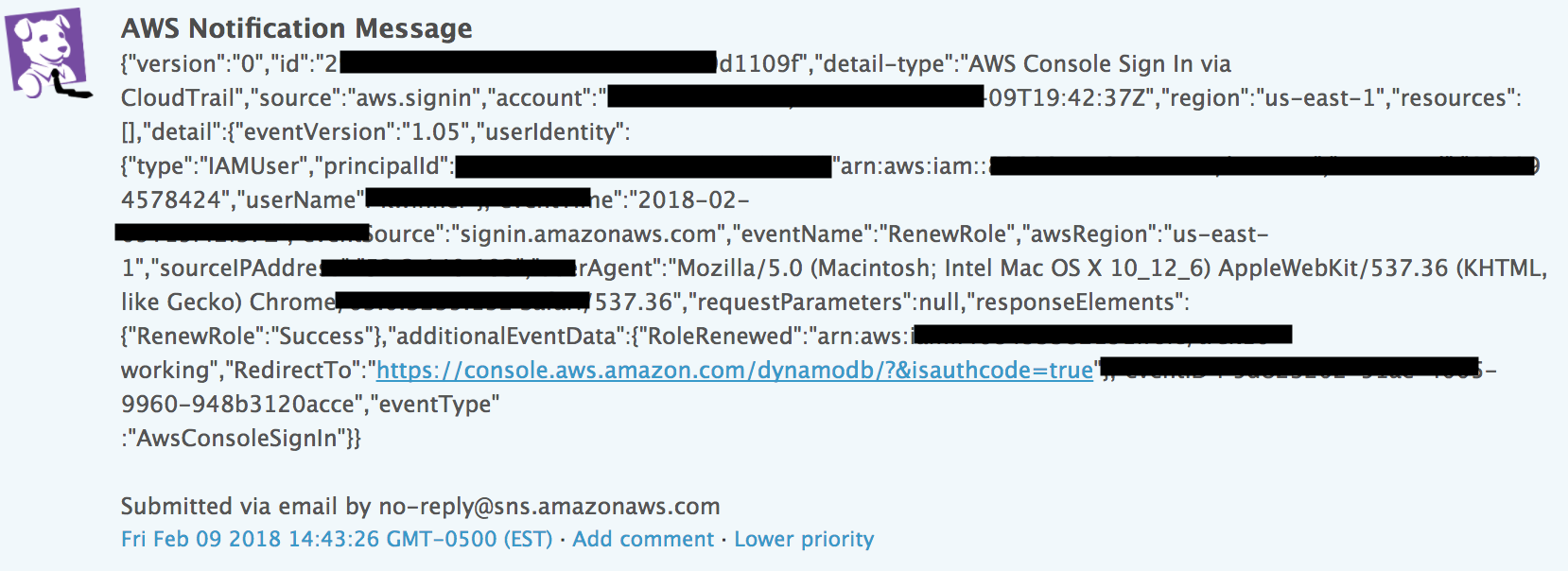
Just an ugly pile of JSON. Yuck! Readability is important, but there’s a second and bigger problem. Datadog’s Event Stream supports tagging; this is really critical for effectively filtering your stream for graph overlays and alerting. These events have no tags with useful information for us to filter/alert off of. (Datadog also supports full text search, but we’ve found that it’s never quite enough to reliably filter what you need.)
We’ve developed a pretty simple and elegant solution to this:
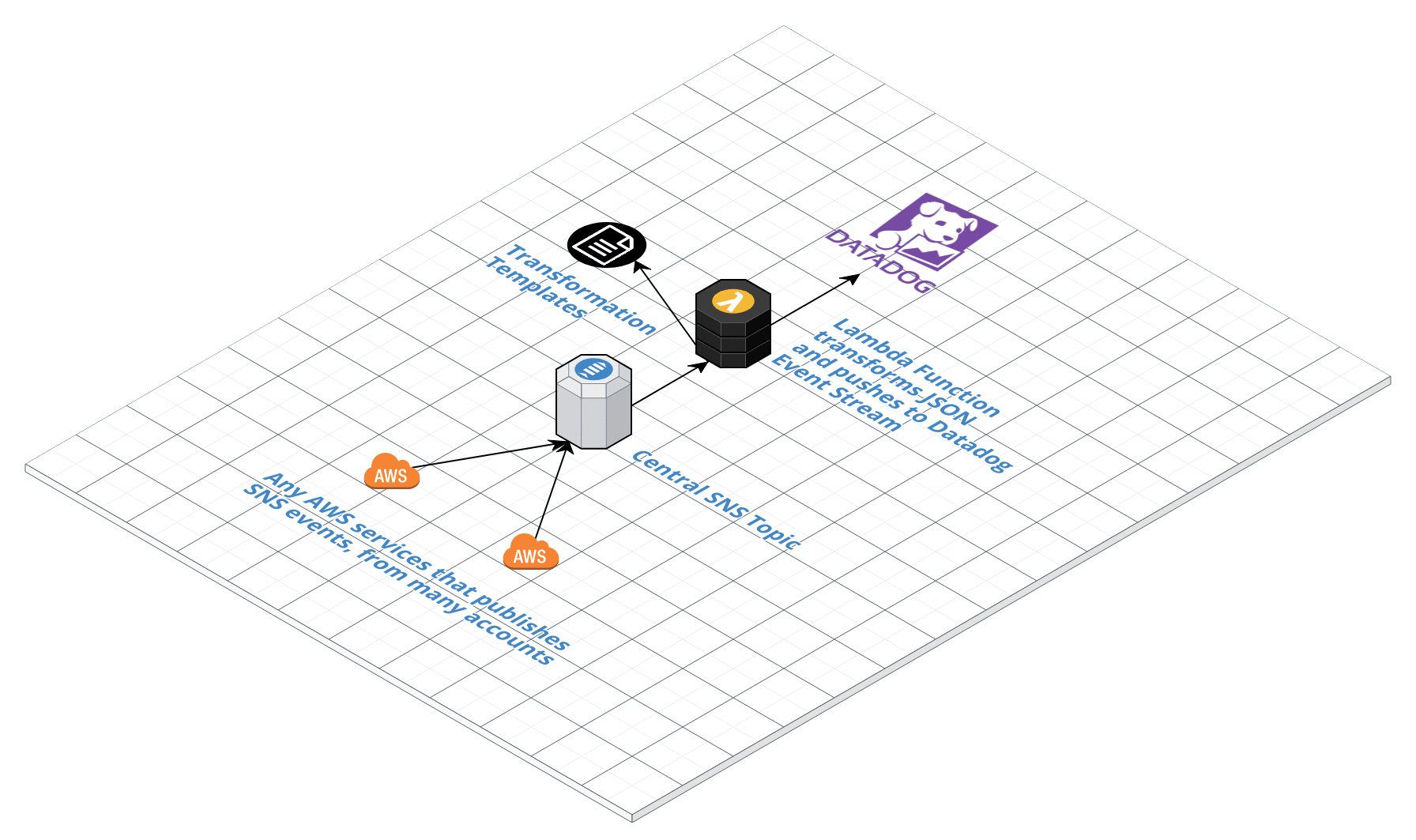
(Side note: If you’re as AWS-obsessed as we are you might be wondering, why not use the awesome new Amazon SNS Message Filtering feature that was released recently!?!? Believe me, we wish we could. But the publisher of the message has to set the message attributes. These are messages that AWS services like CloudWatch Events and Config are sending and those services don’t yet offer that. So if you’re reading this, AWS Product Team Member, hook us up! Please.)
An example mapping template that transforms JSON from an AWS Personal Health Dashboard (AWS Health) event:
Now, you get a nicely formatted and easily readable Datadog event with just the information you need and just the tags you need. Like this:

Nice huh? And the system scales very easily. Create one SNS and one Lambda for all possible events, and create a new mapping template for your particular event.
Let us know if you have interest in this. We’re thinking of generalizing and open sourcing this little utility if there is interest from others.
Founded in 2013, Trek10 helped organizations migrate to and maximize the value of AWS by designing, building, and supporting cloud-native workloads with deep technical expertise. In 2025, Trek10 joined Caylent, forming one of the most comprehensive AWS-only partners in the ecosystem, delivering end-to-end services across strategy, migration and modernization, product innovation, and managed services.
View Trek10's articlesCaylent Services
Reliably Operate and Optimize Your AWS Environment
Caylent Services
Quickly establish an AWS presence that meets technical security framework guidance by establishing automated guardrails that ensure your environments remain compliant.

Explore how Amazon Bedrock AgentCore’s latest capabilities shift the role of managed services providers needed to run agents reliably in production.
The reactive human-plus-tools model has hit its ceiling. Learn why world-class AWS agentic cloud operations require agents governed by domain experts.
Explore how Caylent and AWS are helping organizations move from AI experimentation to execution by combining agentic AI, modernization, and next-generation cloud operations to deliver faster, more secure, and more scalable business outcomes.
matchKey: sourcematchValue: aws.healthtitle: 'Personal Health Dashboard Event: {{ "{{ detail-type "}} }}'text: | %%% Affected Service: {{ "{{ detail.service "}} }} Event Category: {{ "{{ detail.eventTypeCategory "}} }} Time: {{ "{{ detail.startTime "}} }} to {{ "{{ detail.endTime "}} }} {{ "{{ detail.eventDescription.0.latestDescription "}} }} [an example link](https://www.trek10.com/) %%%tags: - 'eventType:awsPHD' - 'PHDservice:{{ "{{ detail.service "}} }}'