 Trek10 Team
Caylent Services
Cloud Operations & Managed Services
Reliably Operate and Optimize Your AWS Environment
Understand the differences between AWS Dedicated Hosts and Dedicated Instances — when to use each, how they impact compliance and licensing, and best practices for controlling tenancy and cost in your cloud environment.
This blog was originally written and published by Trek10, which is now part of Caylent.
Way back in March of 2011, AWS announced the release of Dedicated Instances, which allows organizations to launch EC2 instances on dedicated infrastructure. This led to a lot of questions about AWS Dedicated Instances vs Dedicated Hosting. Typically, when an EC2 instance is launched in a VPC, the virtualized infrastructure is built from a pool of shared resources (e.g., CPU units) that is in use by all customers within a given Availability Zone. When an instance is turned off or terminated, those resources are then released back into the shared pool of available resources. This violates compliance regulations, such as the Health Insurance Portability and Accountability Act (HIPAA), for example, which requires completely dedicated infrastructure for any instances that process Protected Health Information (PHI).
If Dedicated Instances already allow for compliance and increased performance, then what is the purpose of Dedicated Hosts, which were released more recently in November of 2015? Let’s start with the technical difference between Dedicated Instances and Dedicated Hosts. The AWS docs are not sufficiently clear on what the real differences are. The best summary found in the docs is:
“An important difference between a Dedicated Host and a Dedicated Instance is that a Dedicated Host gives you additional visibility and control over how instances are placed on a physical server, and you can consistently deploy your instances to the same physical server over time.”
Simply put, there are no apparent technical differences between Dedicated Instances and Dedicated Hosts from the physical host level. Both services give the option to launch instances to your own Dedicated Hosts with resources that will not be consumed by other customers. The real difference is in the visibility into the physical host that Dedicated Hosts gives you. While Dedicated Instances are extremely valuable from a compliance perspective, Dedicated Hosts also give you the visibility into the physical host that is required for a Bring Your Own License (BYOL) model — i.e., if you want to use your own Windows Server, SQL Server, SUSE, or RHEL licenses that are provided on a CPU core basis.
In addition to licensing visibility, Dedicated Hosts give you the same level of compliance as Dedicated Instances and also add one additional benefit in increased network performance. When all instances are on the same physical host, network latency is minimized (only within that physical host, of course). Dedicated Instances can all potentially launch on the same physical host, but there is no way to know for sure. With Dedicated Hosts, you get the visibility into physical hosts from the AWS console that you need.
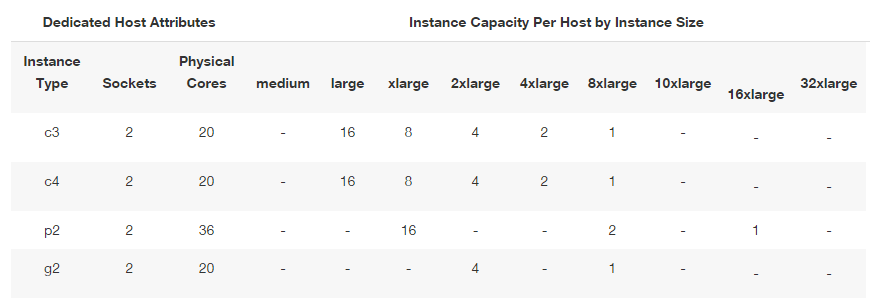
In summary, the differences between Dedicated Instances and Dedicated Hosts are:
Founded in 2013, Trek10 helped organizations migrate to and maximize the value of AWS by designing, building, and supporting cloud-native workloads with deep technical expertise. In 2025, Trek10 joined Caylent, forming one of the most comprehensive AWS-only partners in the ecosystem, delivering end-to-end services across strategy, migration and modernization, product innovation, and managed services.
View Trek10's articlesCaylent Services
Reliably Operate and Optimize Your AWS Environment
Caylent Services
Quickly establish an AWS presence that meets technical security framework guidance by establishing automated guardrails that ensure your environments remain compliant.

Explore how Amazon Bedrock AgentCore’s latest capabilities shift the role of managed services providers needed to run agents reliably in production.
The reactive human-plus-tools model has hit its ceiling. Learn why world-class AWS agentic cloud operations require agents governed by domain experts.
Explore how Caylent and AWS are helping organizations move from AI experimentation to execution by combining agentic AI, modernization, and next-generation cloud operations to deliver faster, more secure, and more scalable business outcomes.
