 Trek10 Team
Caylent Services
Cloud Operations & Managed Services
Reliably Operate and Optimize Your AWS Environment
Explore a practical approach to enterprise CI/CD — balancing speed, reliability, and governance with scalable pipelines, automated testing, and deployment strategies that work for real-world teams and complex systems.
This blog was originally written and published by Trek10, which is now part of Caylent.
First of all, nobody cares how cool your CI/CD pipeline is. I know that hurts to hear. But it’s true.
Here are the things people do care about:
Building a good CI/CD pipeline is a means to that end. And it turns out it’s a lot harder than it looks.
Now, if you had to design a CI/CD pipeline in a vacuum, apart from any organizational complexity, what you would build might look pretty straightforward. It would look, in fact, a lot like the Hello World-type tutorials you can find for any CI/CD product. Something like this:
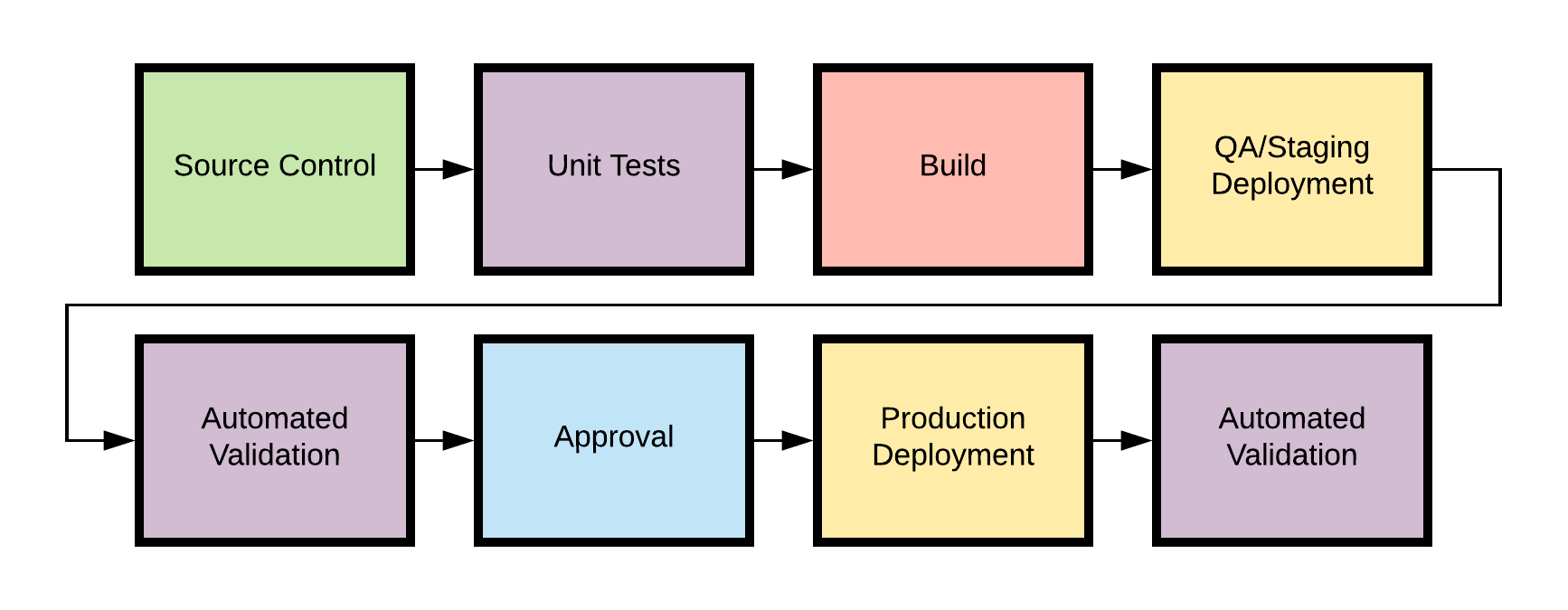
That automates your basic tasks: test your code, build artifacts, and deploy it, with maybe some human sanity check baked in.
In the AWS world, we see more and more people segregating their build stages by AWS account, the only true AWS security boundary. So in reality, your pipeline would have to live in a centralized "shared services" account, reaching out to different environments to deploy using cross-account IAM roles.
That works fine for a single person working on a project, but what if you’re trying to support a whole team of developers? The reality of cloud development is that much more testing happens on deployed services, rather than on a local machine. So it’s important for multiple team members to have access to their own cloud infrastructure stacks.
We’ve recognized this at Trek10 for awhile, which is why we recently open-sourced a Serverless CI/CD AWS Quickstart. It contains the CloudFormation and other automation you need to set up a multi-account CI/CD pipeline that spins up dynamic cloud environments from feature branches.
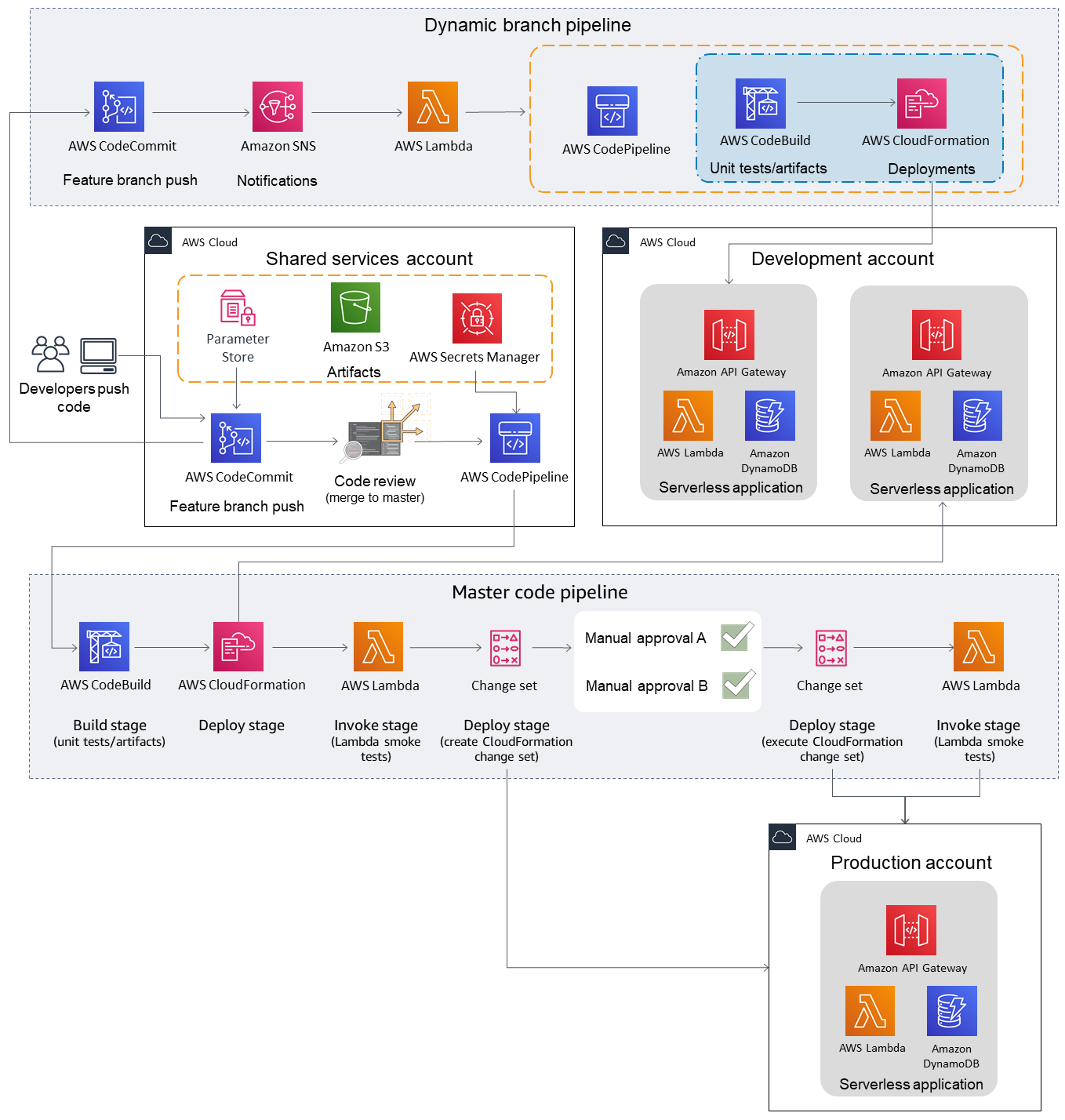
Hey, I never said your pipeline couldn't be cool, just that it's not the most important thing...
That isn’t just a useful setup - it’s really cool!
But we can go even further. In fact, in any large enterprise, we’ll have to go further, because we’ve now reached the point where our design is constrained less by technical requirements and more by the structure of the organization itself. That’s right: we’re about to open up a can of Conway’s Law on our pipeline.
As cool as that quickstart pipeline is, it has one huge limitation: it uses AWS CodePipeline, AWS CodeCommit, and AWS CodeBuild underneath the entire process. As good as those services may be (and they do certain things really well, which we’ll touch on more in a bit), that’s simply not how large enterprises operate. They have significant investments in legacy tooling. Maybe a giant Jenkins instance with a bunch of bespoke plugins. Maybe a proprietary code repository that’s not going anywhere. Or more likely, all of those things at once, because we’re talking about a diverse collection of dev teams, each with their own workflows and problems. The nifty CodePipeline-in-a-box solution may work for somebody, but it probably won’t work for everybody.
And that’s the paradox. Our hypothetical enterprise badly needs a centralized CI/CD solution, because they need to vend out AWS accounts with appropriate security boundaries, and they need to maintain careful control of production deployments.
But they also need a decentralized solution, because no one-size-fits-all approach exists. If you try to impose a single workflow on these dev teams, they will simply work around you. They will implement shadow IT solutions that skimp on safety and accountability in exchange for speed and comfort. And that’s not a viable trade.
There’s no silver bullet here, but one way to approach this problem is by splitting it into two parts: build and release.
When you break this problem down a bit, there’s a clear separation of responsibilities. On the one hand, a product dev team is best equipped to design unit tests and package their artifacts — the “CI” part of “CI/CD”. They know what language they’re using, what tools they’re comfortable with, etc. We’ll call this the “build pipeline”:
BUILD PIPELINE: A set of automated and manual tests that occur when code is pushed to a repository.
This pipeline may contain deployment steps in a test account as well; that's entirely up to the dev team.
The dev team is responsible, then, for automating the conversion of their code into one or more artifacts — a zip file, a transformed CloudFormation template, whatever — that can be deployed in an AWS account. They can use whatever repository, Git flow or CI tool they want, as long as they end up with a deployable output object that is placed in a shared, centrally-accessible location. An S3 bucket is a reasonable place.
Now, the central cloud team, on the other hand, is well-equipped to handle the “CD” part of “CI/CD”: the rollout of that artifact across the various application environments (staging, QA production) that they control. We’ll call this part of the process the “release pipeline”.
RELEASE PIPELINE: A pipeline that promotes deployment artifacts through target account
Having written gross CloudFormation polling scripts on just about every CI/CD platform known to man, I can confirm: this is the textbook definition of undifferentiated heavy lifting, and I want AWS to do it for me.
Whereas the build pipeline can use any combination of tools and workflows, the release process is well-known, well-documented, and strictly regimented. I told you that AWS CodePipeline is really good at certain things. Here’s what it’s good at: deploying CloudFormation stacks.
The central cloud team will develop a set of CodePipeline “release templates” that work for different types of application rollouts (think Kubernetes apps, AWS SAM apps, etc), and manage the permissions and approvals necessary to promote the code between environments.
Let’s look at how this would play out in real life. Follow along with the diagrams and steps below.
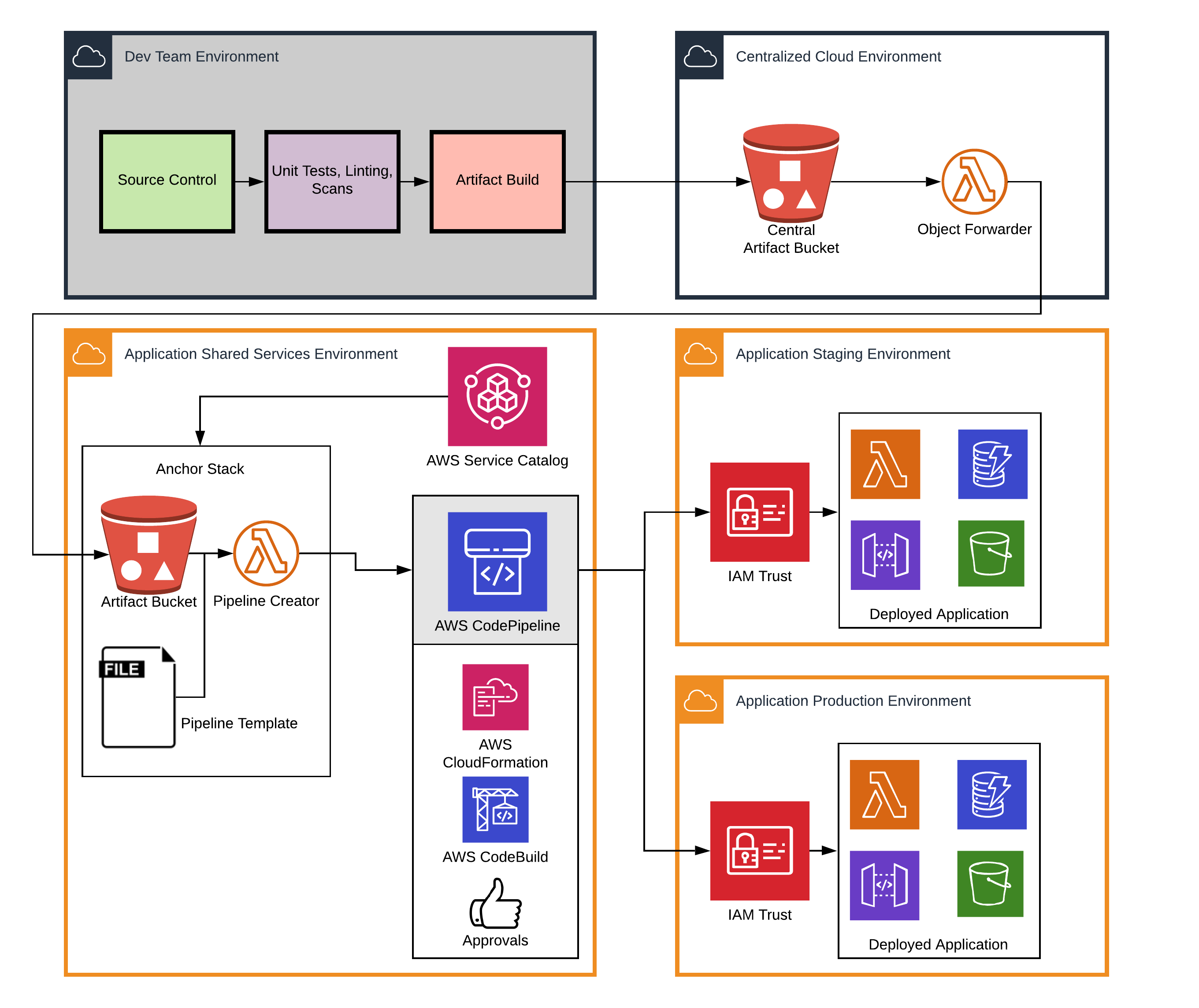
/account_id/app name/branch name/latest.zip.One tricky part of this design is handling the "cleanup" part of the pipeline lifecycle: tearing down the application and associated pipeline on branch deletion. A possible solution is to push a zero-byte artifact to the central bucket at branch deletion time, triggering a cleanup routine.
The cental artifact bucket provides a single, well-known place that build servers can be permissioned to access, while the central IT team can manage the necessary per-account infrastructure for launching and maintaining release pipelines via something like Service Catalog. We refer to that account-specific infrastructure, which includes an S3 cache and Lambda workers, as the “anchor stack”.
Is there complexity here? Of course. But most of it falls exactly where you want it: on the shoulders of the central cloud team, the IAM and CloudFormation nerds. Individual dev teams are freed up to build their own workflows, code does not get to production without passing through a defined release process, and everybody is … well, “happy” is probably too strong a word, but at least they’re doing what matters: working together to deliver value to users, the true goal of any CI/CD system.
Life comes at you fast, and these designs continue to evolve as we work with our clients. How are you using CI/CD in your organization for quick, safe, accountable deployments? Reach out to us — we’d love to hear from you.
The ideas in this post were developed in collaboration with numerous people at Trek10 — Joel Haubold deserves special mention.
Founded in 2013, Trek10 helped organizations migrate to and maximize the value of AWS by designing, building, and supporting cloud-native workloads with deep technical expertise. In 2025, Trek10 joined Caylent, forming one of the most comprehensive AWS-only partners in the ecosystem, delivering end-to-end services across strategy, migration and modernization, product innovation, and managed services.
View Trek10's articlesCaylent Services
Reliably Operate and Optimize Your AWS Environment
Caylent Services
Quickly establish an AWS presence that meets technical security framework guidance by establishing automated guardrails that ensure your environments remain compliant.

Explore how Amazon Bedrock AgentCore’s latest capabilities shift the role of managed services providers needed to run agents reliably in production.
The reactive human-plus-tools model has hit its ceiling. Learn why world-class AWS agentic cloud operations require agents governed by domain experts.
Explore how Caylent and AWS are helping organizations move from AI experimentation to execution by combining agentic AI, modernization, and next-generation cloud operations to deliver faster, more secure, and more scalable business outcomes.
