 Guille Ojeda
Caylent Catalysts™
LLMOps Strategy
Manage, optimize, and future-proof your AI initiatives with a well-defined LLMOps strategy.
Explore how to use prompt caching on Large Language Models (LLMs) such as Amazon Bedrock and Anthropic Claude to reduce costs and improve latency.
This article was updated on January 27th, 2026.
If you've been working with large language models (LLMs) for any amount of time, you know that two major pain points always come up: cost and latency. Every token processed costs money, and if you're sending the same context repeatedly (like that massive document your users keep asking questions about), you're essentially throwing money away on redundant computations. And let's not even get started on latency; nobody wants to wait seconds (or worse, tens of seconds) for an LLM to respond in an interactive application.
That's why prompt caching is such an important technique to understand. It can dramatically cut costs and speed up responses when working with LLMs like Anthropic Claude on Amazon Bedrock. In this article, we'll dive deep into what prompt caching is, how it works under the hood, and most importantly, how to implement it to reduce your AWS bill while improving your user experience.
Prompt caching is a technique for improving the efficiency of LLM queries by storing and reusing frequently used prompt content. In simple terms, it lets you save repeated prompt prefixes (like system instructions or reference documents) so the model doesn't have to reprocess them on subsequent requests.
Think of it like this: normally, when you send a prompt to an LLM, the model reads through the entire text from start to finish, token by token, building up its internal representation of the context. If you send the same content multiple times, the model repeats this work each time, unnecessarily burning compute and your money. With prompt caching, you can tell the model, "Remember this part, we'll reuse it later," and on subsequent requests, it can skip directly to processing just the new content.
Amazon Bedrock's implementation of prompt caching allows you to designate specific points in your prompts as "cache checkpoints." Once a checkpoint is set, everything before it is cached and can be retrieved in later requests without being reprocessed. But how exactly does the model "remember" this content? The actual mechanism involves preserving the model's internal state, the attention patterns, and hidden state vectors that represent the processed tokens, so they can be loaded instead of recalculated on subsequent requests.
Want to get really technical? One compute intensive calculation in generative pretrained transformer models is the attention calculation, which determines how a model “attends” to tokens in the input and how those tokens relate to each other. The attention calculation depends on 3 values: the K, Q, and V tensors. Once the K and V tensors are calculated for a particular input, they don't change, so a common technique to speed up inference is to cache the K and V tensors. That's what we're really caching here, not the input itself (i.e. the 50 pages of plain text), but the numerical values of the K and V tensors in the matrix that is the neural network, in its state after it processed the input.
The benefits of prompt caching are substantial and directly address the two pain points mentioned earlier:
Decreased latency: By avoiding redundant processing of identical prompt segments, response times can improve dramatically. Amazon Bedrock reports up to 85% faster responses for cached content on supported models. For interactive applications like chatbots, this can mean the difference between a fluid conversation and a frustratingly laggy experience. And if you're building agentic applications where the model might make multiple API calls in sequence, that latency reduction compounds with each step.
Reduced costs: This is where things get really interesting. When you retrieve tokens from cache instead of reprocessing them, you pay significantly less; cached tokens typically cost only about 10% of the price of regular input tokens. That means a potential 90% cost reduction for the cached portion of your prompts. For applications that repeatedly use large chunks of context (think document QA with a 100-page manual), this translates to a lot of savings. We'll do the math later to show exactly how much you can save.
Improved user experience: Faster responses and the ability to maintain more context for the same cost mean you can build more responsive, more contextually aware applications. Your users won't necessarily know you're using prompt caching, but they'll certainly notice the snappier responses and more coherent conversations. Note: Caching doesn't increase the max context window, but in my experience, you end up using more context because it's a lot cheaper.
Let's dive into the mechanics of how prompt caching actually functions in Amazon Bedrock. Understanding these details will help you implement caching effectively and squeeze the maximum benefit from it.
When prompt caching is enabled, Bedrock creates "cache checkpoints" at specific points in your prompts. A checkpoint marks the point at which the entire preceding prompt prefix (all tokens up to that point) is saved in the cache. On subsequent requests, if your prompt reuses that same prefix, the model loads the cached state instead of recomputing it.
Technically speaking, what's happening is quite fascinating. The model doesn't just store the raw text; it preserves its entire internal state after processing the cached portion. Modern LLMs like Claude use transformer architectures with hundreds of layers of attention mechanisms. When processing text, each layer generates activation patterns and state vectors that represent the semantic content and relationships in the text. These layers normally need to be calculated sequentially from scratch for every prompt.
With caching, the model saves all these complicated attention patterns and hidden states (specifically, the K and V tensors) after processing the cached portion. When you send a subsequent request with the same cached prefix, instead of running all those calculations again, it loads the saved state and picks up from there. It's like giving the model a photographic memory of its own thinking process, so it can go back to a half-thought thought and rethink the parts after that, instead of starting the rethinking from scratch.
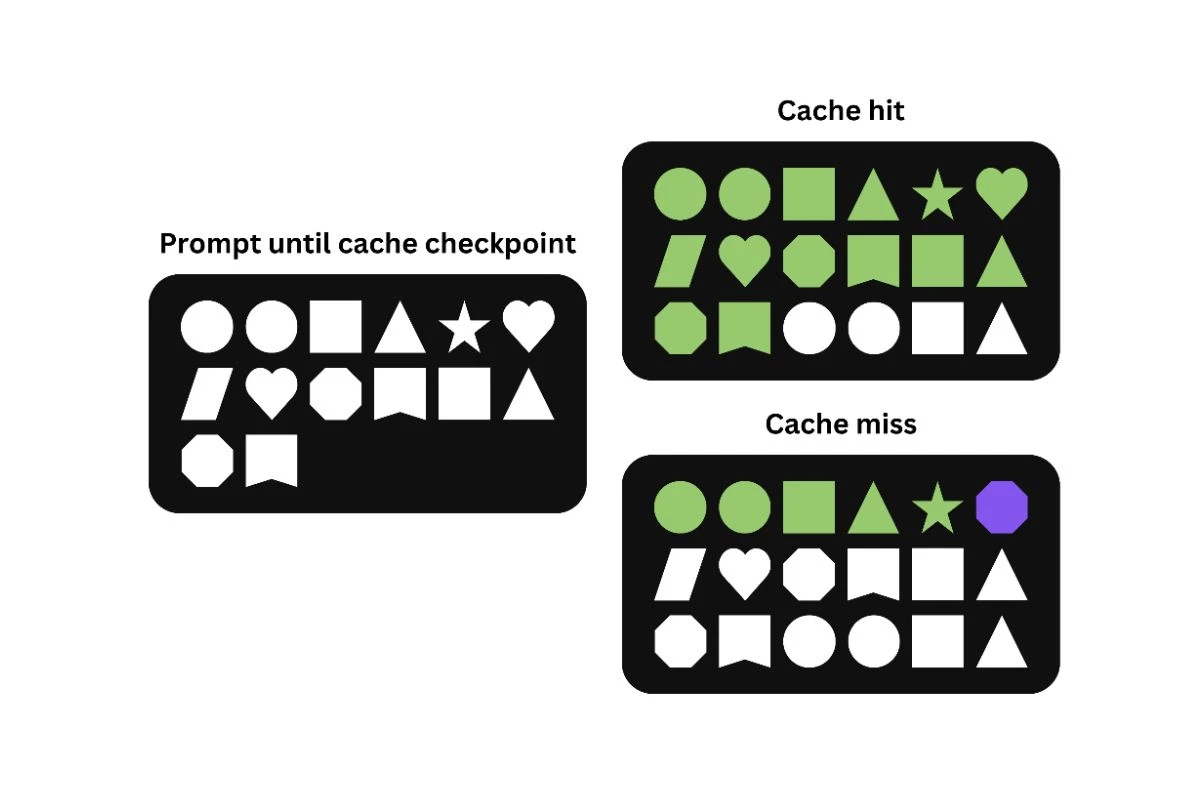
The cache in Amazon Bedrock is ephemeral with a default Time To Live (TTL) of 5 minutes. Each time a cached prefix is reused, this timer resets, so as long as you're actively using the cache, it stays alive. If no request hits the cache within 5 minutes, it expires, and the saved context is discarded. You can always start a new cache by re-sending the content, but for optimal efficiency, you'll want to structure your application to reuse cached content within that window.
As of January 26th, 2026, the TTL value can be set to 5 minutes or 1 hour for Claude Haiku 4.5, Claude Sonnet 4.5 and Claude Opus 4.5. At the moment, those are the only models supporting a 1-hour TTL on prompt caching.
There are a few important technical constraints to be aware of:
Token thresholds: Cache checkpoints are subject to a minimum token requirement. You can only create a checkpoint after the prompt (plus any model-generated response so far) reaches a certain length, which varies by model. Amazon Nova models require a minimum 1,024 tokens of combined conversation before the first checkpoint can be set. Subsequent checkpoints can be created at further intervals up to a model-defined maximum number of checkpoints (often up to 4 for large models).
For Nova models, the thresholds work like this:
Claude Sonnet 4.5 and all older models except Haiku 3.5 use the same limits. Claude Haiku 3.5 has a minimum of 2,048 tokens. Claude Opus 4.5 and Haiku 4.5 have a minimum of 4.096 tokens.
If you attempt to insert a checkpoint too early (before the minimum tokens), the request will still succeed but that checkpoint is simply not added. This is important to understand because it means your caching strategy might not be working as expected if you're placing checkpoints too early in the prompt.
Cache limits: The limit is 4 checkpoints, and up to 32k cached tokens for Claude models, 20k cached tokens for Nova models. The number of checkpoints matters because it determines how many distinct segments of your prompt can be cached independently.
Model support: Not every model is supported. As of January 27th, 2026, only Claude and Nova models are supported, with support for Nova 2 models coming soon. Always check the latest Amazon Bedrock documentation for your model to understand its caching capabilities.
Prompt caching works with multiple Amazon Bedrock inference APIs:
With Claude models you can use simplified cache management, where you simply place one checkpoint at the end of static content, and Bedrock automatically checks for cache hits at previous content-block boundaries. It will automatically look back up to 20 content blocks, and use the longest matching prefix it finds as a cache hit.
Amazon Nova, on the other hand, supports automatic prompt caching for all text prompts, including User and System messages. Bedrock will automatically create cache points for requests to Nova models, and if the first part of your prompts repeats itself, it will automatically hit those caches. This can potentially improve your latency without any explicit configuration, but it does not give you the cost benefits of prompt caching.
We still recommend you consider explicit prompt caching. Having more control over your caches will give you better cost savings, and you can improve cache hits significantly if you're caching sections that change at different frequencies.
Prompt caching can also be used in combination with cross region inference. When you use a cross-region inference profile, Bedrock will automatically choose the best AWS Region to serve your inference request, amongst those covered by that inference profile, and route the inference request to that region. Caches are regional, so you might send two identical requests to the same inference profile and have the second one be a cache miss, if they were routed to different regions. Overall, cross-region inference is very likely to reduce your cache hits. However, in some cases, such as with certain models, it's impossible to avoid using cross-region inference profiles, and it's important to know that prompt caching still works in those cases.
To illustrate how to use prompt caching with Amazon Bedrock, let's look at a few concrete examples. We'll show both the conceptual structure and actual code implementation.
Example 1: Multi-turn Conversation with Document QA
Imagine you're building a document QA system where users can upload a document and then ask multiple questions about it. Without caching, you'd need to send the entire document with each new question, incurring full costs every time. With caching, you can send it once and reuse it.
Here's how you might implement this using the Bedrock Converse API:
In this example, the first call to converse processes and caches the document. For the second question, we include the document again in the conversation history, but because it was cached, Bedrock will retrieve it from cache instead of reprocessing it. This significantly speeds up the response and reduces cost.
We added error handling and logging to this code snippet to check if the caching is working as expected. This is pretty irrelevant for a code sample, but in production, you'll want to know if your caching strategy is effective.
If you're curious about whether the caching is working, you can check the usage metrics in the response:
In the first call, you'll see a large number in cacheWriteInputTokens (the document's tokens). In the second call, those same tokens will show up in cacheReadInputTokens, indicating they were pulled from cache rather than being processed again.
Example 2: Single-turn Prompt with Reusable Instructions
For applications that use single-turn completions with lengthy instructions, you can use the InvokeModel API with caching. Here's a more complete example with Claude:
On the second request, even though we include the same instructions, they'll be retrieved from cache instead of being reprocessed. This saves both time and money.
Now let's talk about what probably interests you most: the money. Just how much can prompt caching save you? The answer is potentially a lot, depending on your usage patterns.
Here's how the cost structure works:
Let's work through an example to see the cost implications with real numbers:
Imagine you have a 20,000-token document that users frequently ask questions about. Without caching, if users ask 10 questions in a session, you'd process that document 10 times, for a total of 200,000 input tokens.
With prompt caching:
Let's break down the math with Claude Sonnet 4.5. Pricing may change, you should always check the Amazon Bedrock pricing page. We'll use the pricing for Claude Sonnet 4.5 as of January 27th, 2026:
Without caching:
With caching:
Total savings: $0.60 - $0.129 = $0.471, or about 78%
But wait, let's scale this up to a more realistic scenario. Say you have an enterprise document QA system handling 1,000 queries per day against 10 different documents (each 20,000 tokens). Assuming each document gets 100 queries:
Without caching:
With caching:
Monthly savings: $1,800 - $200.70 = $1,599.30, or about 89%
That's almost $20,000 in savings per year just from implementing prompt caching! And this doesn't even account for the latency improvements and better user experience.
The math gets even more compelling with larger documents or more frequent reuse within the 5-minute window. For applications that handle many similar requests, the savings can add up to thousands of dollars per month.
It's worth noting that even with the cache write overhead, prompt caching is almost always more cost-effective as long as you reuse the cached content at least once. The break-even point is very low, making this a no-brainer optimization for most LLM applications.
Now that we understand how prompt caching works and the cost benefits it offers, let's explore some practical use cases where it shines particularly bright.
Chatbots and virtual assistants benefit tremendously from prompt caching, especially in extended conversations where consistent background context is needed.
In conversational AI, you typically supply a fixed "system" prompt that defines the assistant's persona, capabilities, and behavioral guidelines. Without caching, the model processes this same block of instructions on every user turn, adding latency and cost each time.
With Bedrock's prompt caching, you can cache these instructions after the first turn. The model will reuse the cached instructions for subsequent user messages, effectively remembering its "personality" without re-reading it from scratch.
This is particularly valuable for assistants that maintain state over a conversation, like a customer service bot that has access to account details or order history. You can cache this user-specific context once and handle many Q&A turns quickly and cheaply.
For example, if we're building a travel assistant that helps users plan trips, we might have:
Without caching, each user message would require reprocessing all 6,000 tokens. With caching, subsequent messages only need to process the new user input, potentially saving thousands of tokens per turn. And in a typical conversation with 10-20 turns, these savings add up quickly.
AI coding assistants often need to include relevant code context in their prompts. This could be a summary of the project, the content of certain files, or the last N lines of code being edited.
Prompt caching can significantly optimize AI-driven coding help by keeping that context readily available. A coding assistant might cache a large snippet of code once, then reuse it for multiple queries about that code.
For instance, if a developer uploads a module and asks "Explain how this function works," followed by "How could I optimize this loop?", the assistant can pull the cached representation of the code instead of reprocessing it. This leads to faster suggestions and lower token usage.
The assistant effectively "remembers" the code it has seen, which makes interactions more fluid and natural. Bedrock's caching allows the assistant to maintain state over multiple interactions without repeated cost.
For programming environments, the caching can be particularly valuable when dealing with large files or complex projects. A developer might want to ask multiple questions about the same file or function, and with caching, the assistant doesn't need to reanalyze the entire codebase for each query. This can lead to significantly faster response times and a more seamless development workflow.
One of the most compelling use cases is any scenario involving large documents or texts that the model must analyze or answer questions about. Examples include:
These often involve feeding very long text (tens of thousands of tokens) into the model. Prompt caching lets you embed the entire document in the prompt once, cache it, and then ask multiple questions without reprocessing the full text every time.
In Amazon Bedrock, you would send the document with a cachePoint after it on the first request. The model will cache the document's representation. Subsequent requests can all reuse the cached content.
This drastically cuts down response time since the model is essentially doing a lookup for the document content from cache, and it reduces cost because those thousands of tokens are billed at the cheap cache-read rate.
In practical terms, caching enables real-time interactive querying of large texts. Users can get answers almost immediately even if the document is huge, because the expensive step of reading the document was done only once.
Consider a legal contract review application: A typical contract might be 30-50 pages, or roughly 15,000-25,000 tokens. Without caching, each question about the contract would require sending all those tokens again. With caching, the first question might take a few seconds to process, but subsequent questions could return answers in under a second, at a fraction of the cost. This makes the difference between a clunky, expensive tool and a responsive, cost-effective one.
While prompt caching offers significant benefits, it's important to understand its limitations and potential edge cases:
Cache TTL constraint: The time-to-live for cached content is a hard limit. If your application has longer periods of inactivity between related requests, the cache will expire, and you'll need to reprocess the full prompt. This can be particularly challenging for user-facing applications where users might take breaks or get distracted. To mitigate this, you might implement a background process that periodically "refreshes" important caches with dummy requests. Remember that for Claude models you can choose a TTL of 5 minutes or 1 hour, and Nova models only support a TTL of 5 minutes.
Minimum token thresholds: As mentioned earlier, cache checkpoints can only be set after meeting model-specific minimum token counts. If your prompt is shorter than this threshold, caching won't work. This means caching is less beneficial for very short prompts or the beginning of conversations.
Identical prefix requirement: Caching only works if the exact same prefix is reused. Even minor changes or edits to the cached content will result in a cache miss. This can be problematic for applications that need to make small updates to an otherwise stable context.
Debugging complexity: When prompt caching isn't working as expected, debugging can be challenging. The cache mechanisms are largely opaque, and you're limited to the usage metrics in the response to determine if caching is working. This can make troubleshooting production issues more difficult.
Regional availability: Prompt caching might not be available in all AWS regions where Bedrock is offered, which could affect your application's architecture if you need multi-region deployment. It does work with cross-region inference, but since cache points are regional, requests that get routed to different regions by a cross-region inference profile may produce more cache misses than if you used a single-region inference profile.
Despite these limitations, the benefits of prompt caching typically outweigh the drawbacks for most use cases. Being aware of these constraints will help you design more robust applications that can handle edge cases gracefully.
When implementing prompt caching in production systems, there are several architectural considerations to keep in mind:
Integration with existing AWS services: Prompt caching works well within the broader AWS ecosystem. You can trigger Bedrock calls with cached prompts from AWS Lambda functions, AWS Step Functions workflows, or Amazon EC2 instances. For high-throughput applications, consider using Amazon SQS to queue requests and process them with appropriate caching strategies.
Cache warming strategies: For applications with predictable usage patterns, you might implement "cache warming" by proactively sending requests that establish caches for commonly used content just before they're needed. For example, if you know users typically query certain documents during business hours, you could warm those caches at the start of the day.
Handling cache misses: Your architecture should gracefully handle cache misses, whether due to TTL expiration or first-time access. This might involve monitoring response times and token costs, and dynamically adjusting your application flow based on whether a cache hit occurred. Sometimes there is nothing you can do about it, but just acknowledging that is an architecture consideration.
Redundancy planning: Since caching is ephemeral and can fail, your architecture should never depend critically on caching working perfectly. Always design with fallbacks that can handle uncached requests, even if they're slower or more expensive.
Monitoring and optimization: Implement Amazon CloudWatch metrics to track cache hit rates, cost savings, and latency improvements. This data can help you refine your caching strategy over time and identify opportunities for further optimization.
A well-designed architecture that leverages prompt caching effectively can lead to significant cost savings while maintaining or improving performance. The key is to integrate caching into your application flow in a way that's resilient to cache misses and expiration.
Now that we've covered the what, why, and how of prompt caching, let's talk about some best practices to get the most out of it:
Structure your prompts with caching in mind: Place static content (like instructions, reference material, or documents) early in the prompt, followed by a cache checkpoint, then the dynamic content (like the specific question). This makes the static portion cacheable. For example, in a document QA system, place the document text first, followed by a cache checkpoint, then the user's question.
Place checkpoints strategically: Put cache checkpoints at logical boundaries (right after large reference material or system prompts) once the minimum token count is met. For multi-turn conversations, insert checkpoints after turns where significant context was added. Remember that different models have different minimum token requirements for checkpoints, so design accordingly.
Monitor your cache usage: Check the cache read/write metrics to verify your cache checkpoints are working as expected. If you're not seeing tokens in the cache read counter, your cache might be expiring or not being set correctly. Add logging in your application to track these metrics over time and alert on unexpected patterns.
Remember the TTL: If user interactions might pause for longer than 5 minutes, you'll need to re-send the context to re-prime the cache. All Claude 4.5 models can set a TTL of 5 minutes or 1 hour, and Nova models only support 5 minutes. Consider building a mechanism to detect when cache refreshes are needed, perhaps by tracking the timestamp of the last cache hit and proactively refreshing if approaching the TTL limit. And always be prepared for your requests to be a cache miss.
Test different cache placements: Experiment with where you place cache checkpoints and monitor the effects on token usage and latency. The optimal configuration may vary depending on your specific use case. A/B testing different caching strategies can help identify the most effective approach for your application.
Use multiple checkpoints when appropriate: For complex prompts with multiple distinct sections, consider using multiple cache checkpoints. This can be particularly useful for conversations that evolve over time, allowing you to cache different segments independently. For example, in a document QA system, you might have one checkpoint after the document and another after a summary or analysis. This also allows you to easily implement conversational branching: the ability to branch several conversations from a specific point in a conversation. You can save each branching point in a checkpoint, and you don't need to reprocess the entire context of the conversation from before it branched.
Consider model-specific limitations: Design your caching strategy with your specific model's constraints in mind. Nova and Claude models have different minimum and maximum tokens for caches, and these constraints may evolve in the future.
By following these practices, you can maximize the cost savings and performance benefits of prompt caching while avoiding common pitfalls.
If you're ready to implement prompt caching in your own applications, here are some next steps to consider:
For a more comprehensive approach to optimizing LLM applications with Claude and Amazon Bedrock, check out our LLMOps Strategy guide. It covers not just prompt caching but a full suite of best practices for building, deploying, and optimizing LLM-powered applications.
Prompt caching represents one of those rare optimizations that improves both cost and performance simultaneously. By understanding how it works and implementing it correctly, you can build more responsive, more cost-effective AI experiences for your users. The technical implementation isn't particularly complex, but the impact on your application's economics and user experience can be substantial. If you're using LLMs in production, especially with repeated context or large prompts, prompt caching should definitely be in your optimization toolkit.
Implementing prompt caching effectively requires more than flipping a switch; it takes a deep understanding of model behavior, cost tradeoffs, and production architecture. Caylent’s AWS-certified experts have extensive hands-on experience building, optimizing, and operating LLM-powered applications on Amazon Bedrock. We help organizations design and deploy scalable, secure, and cost-efficient AI solutions on AWS so you can move from experimentation to production with confidence. If you’re looking to reduce latency, control costs, and get more value out of Bedrock, Caylent can help you get there faster. Reach out today to get started.
Prompt caching optimizes Large Language Model (LLM) performance by storing and reusing the model's internal state. This technique prevents the model from repeatedly recomputing identical prompt segments, significantly reducing latency and cost. By allowing frequently reused prompt content to be retrieved from a cache at a much lower cost than reprocessing them, prompt caching also leads to substantial cost savings, especially in applications with frequently reused context.
A primary limitation is the ephemeral 5-minute Time To Live (TTL) for cached content, which resets with each use. If the cache is not actively used, the cache expires which then requires full reprocessing. Additionally, caching requires an exact match of the prompt prefix; meaning even minor alterations will result in a cache miss. Minimum token thresholds must also be met before a checkpoint can be set, making it less effective for very short prompts.
Prompt caching provides substantial benefits for applications requiring consistent, repeated context across multiple interactions. This include:
To ensure successful implementation of prompt caching, developers should:
Prompt caching can reduce costs when applications repeatedly use the same context or instructions. The first time a segment is cached, it may be slightly more expensive than standard inference because it needs to be stored. However, once cached, reusing that segment is typically much cheaper than reprocessing it as new input tokens.
The pricing model relates differently for workloads with large prompts or repeated patterns. With system messages, reference documents, or shared context across queries, for example, the model offers significant savings compared to standard token usage. The actual impact depends on how often cached content is reused and the specific pricing set by the model provider.

Guille Ojeda is a Principal Innovation Architect at Caylent, a speaker, author, and content creator. He has published 2 books, over 200 blog articles, and writes a free newsletter called Simple AWS with more than 45,000 subscribers. He's spoken at multiple AWS Summits and other events, and was recognized as AWS Builder of the Year in 2025.
View Guille's articlesCaylent Catalysts™
Manage, optimize, and future-proof your AI initiatives with a well-defined LLMOps strategy.
Caylent Services
Apply artificial intelligence (AI) to your data to automate business processes and predict outcomes. Gain a competitive edge in your industry and make more informed decisions.
Leveraging our accelerators and technical experience
Browse GenAI Offerings


Explore what’s new in Claude Opus 5.5, from stronger coding and knowledge-work performance to lower pricing, updated API behavior, and broader safeguards.

Explore what’s new in Claude Fable 5.1, how it compares to Fable 5, and what organizations should validate before migrating their workloads.
import boto3

AWS_REGION = "us-east-1"
MODEL_ID = "anthropic.claude-sonnet-4-5-20250929-v1:0"

bedrock = boto3.client("bedrock-runtime", region_name=AWS_REGION)
document_text = "... [long document content] ..."

first_question = "What are the main topics in this document?"

# First interaction - cache the document
messages = [{"role": "user", "content": []}]
# Add the document to the user message
messages[0]["content"].append({"text": document_text})
# Mark cache checkpoint after the document
messages[0]["content"].append({"cachePoint": {"type": "default", "ttl": "1h"}})
# Add the user's first question
messages[0]["content"].append({"text": first_question})

try:
    response = bedrock.converse(
        modelId=MODEL_ID,
        messages=messages
    )

    # Check if caching worked by looking at usage metrics
    cache_write_tokens = response["usage"].get("cacheWriteInputTokens", 0)
    print(f"Cached {cache_write_tokens} tokens on first request")

    assistant_text = response["output"]["message"]["content"][0]["text"]

except Exception as e:
    print(f"Error in first request: {e}")
    # Implement fallback strategy if caching fails
    raise

# Second interaction - reuse cached document
followup_question = "Can you elaborate on the second point?"
messages = [
    {
        "role": "user",
        "content": [
            {"text": document_text},
            {"cachePoint": {"type": "default", "ttl": "1h"}},
            {"text": first_question},
        ],
    },
    {"role": "assistant", "content": [{"text": assistant_text}]},
    {"role": "user", "content": [{"text": followup_question}]},
]

try:
    response2 = bedrock.converse(
        modelId=MODEL_ID,
        messages=messages
    )

    # Verify cache hit
    cache_read_tokens = response2["usage"].get("cacheReadInputTokens", 0)
    print(f"Retrieved {cache_read_tokens} tokens from cache on second request")

except Exception as e:
    print(f"Error in second request: {e}")
    # Handle errors appropriately
    raise
# First call - cache write
print("First call usage:")
print(f"Input tokens: {response['usage']['inputTokens']}")
print(f"Output tokens: {response['usage']['outputTokens']}")
print(f"Cache write tokens: {response['usage'].get('cacheWriteInputTokens', 0)}")
print(f"Cache read tokens: {response['usage'].get('cacheReadInputTokens', 0)}")

# Second call - cache read
print("Second call usage:")
print(f"Input tokens: {response2['usage']['inputTokens']}")
print(f"Output tokens: {response2['usage']['outputTokens']}")
print(f"Cache write tokens: {response2['usage'].get('cacheWriteInputTokens', 0)}")
print(f"Cache read tokens: {response2['usage'].get('cacheReadInputTokens', 0)}")
import boto3
import json
import time

AWS_REGION = "us-east-1"
MODEL_ID = "anthropic.claude-sonnet-4-5-20250929-v1:0"

bedrock = boto3.client("bedrock-runtime", region_name=AWS_REGION)
instructions = "Here are detailed guidelines and examples for generating technical documentation: [... long instructions ...]"

# First request - cache the instructions
payload = {
    "anthropic_version": "bedrock-2023-05-31",
    "max_tokens": 1000,
    "system": "You are a technical documentation specialist.",
    "messages": [
        {
            "role": "user",
            "content": [
                {
                    "type": "text",
                    "text": instructions,
                    "cache_control": {
                        "type": "ephemeral",
                        "ttl": "1h"
                    }
                },
                {
                    "type": "text",
                    "text": "Write documentation for a REST API endpoint that handles user registration"
                }
            ]
        }
    ],
    "temperature": 0.7
}

try:
    response = bedrock.invoke_model(
        modelId=MODEL_ID,
        contentType="application/json",
        accept="application/json",
        body=json.dumps(payload).encode("utf-8")
    )

    response_body = json.loads(response["body"].read().decode("utf-8"))

    # Check if caching succeeded in first request
    usage = response_body.get("usage", {})
    cache_create_tokens = usage.get("cache_creation_input_tokens", 0)
    cache_read_tokens = usage.get("cache_read_input_tokens", 0)

    if cache_create_tokens > 0:
        print(f"Successfully cached instructions ({cache_create_tokens} tokens)")
    elif cache_read_tokens > 0:
        print(f"Reused cached instructions ({cache_read_tokens} tokens)")
    else:
        print("Warning: Instructions may not have been cached")

except Exception as e:
    print(f"Error in first request: {e}")
    raise

# Second request - reuse cached instructions
second_payload = {
    "anthropic_version": "bedrock-2023-05-31",
    "max_tokens": 1000,
    "system": "You are a technical documentation specialist.",
    "messages": [
        {
            "role": "user",
            "content": [
                {
                    "type": "text",
                    "text": instructions,
                    "cache_control": {
                        "type": "ephemeral",
                        "ttl": "1h"
                    }
                },
                {
                    "type": "text",
                    "text": "Write documentation for a user profile update endpoint"
                }
            ]
        }
    ],
    "temperature": 0.7
}

try:
    start_time = time.time()
    response2 = bedrock.invoke_model(
        modelId=MODEL_ID,
        contentType="application/json",
        accept="application/json",
        body=json.dumps(second_payload).encode("utf-8")
    )

    response_time = time.time() - start_time
    response_body2 = json.loads(response2["body"].read().decode("utf-8"))

    # Verify cache hit
    usage2 = response_body2.get("usage", {})
    cache_read = usage2.get("cache_read_input_tokens", 0)
    print(f"Retrieved {cache_read} tokens from cache in {response_time:.2f}s")

except Exception as e:
    print(f"Error in second request: {e}")
    raise
