 Trek10 Team
Caylent Services
Cloud Operations & Managed Services
Reliably Operate and Optimize Your AWS Environment
Gain a headstart on your understanding of AWS CloudFormation with some helpful tips from our experts.
This blog was originally written and published by Trek10, which is now part of Caylent.
Amazon Web Services is one of the coolest suites of cloud services I’ve ever worked with, especially when I was first getting my feet wet a few years ago. Being able to build and connect to a web server with EC2 in under an hour’s work was a great feeling. However, production work often requires quite a bit more than that, and configuring each service manually through the AWS console gets quite slow and complicated. This is where CloudFormation comes in. I started learning CloudFormation at Trek10 in mid-2021, and it has quickly become one of my favorite ways to interact with AWS. It provides an efficient way to build infrastructures, a high-level view of that infrastructure since everything that AWS is going to spin up for you is contained in your CloudFormation template and an easy way to deploy those exact infrastructures in multiple environments, accounts, and regions. Once your template is up and running, you’ll be able to re-upload that template and be confident it will perform the same every time. You can even break sections of the infrastructure into separate templates that are linked by a master template, though that is a bit more advanced than the tips I’ll be providing here. Lastly, the best part of CloudFormation in my opinion is that everything you write can save you time in the future and improve your workflow. I’ve often taken snippets of an EC2 instance, RDS database, or security group and modified them to be used in another template instead of writing them from scratch. So, without further ado, here are 4 tips for those who are just getting started with CloudFormation.
You’ve probably seen template and code snippets for CloudFormation using a data-serialization language called YAML. This language functions similarly to JSON, but with a more streamlined structure. Fortunately, you don’t have to know both languages to be effective at writing for both. There are multiple websites like this one that will convert YAML to JSON, or vice versa, which means if a client or company you’re working for prefers one over the other, you can write your templates in the language you know, then paste your code into the website and voila, it will be converted over to the other language. VSCode even has an extension for converting code right in the editor. These tools are also quite helpful for learning the language you’re unfamiliar with, as you can see how the two compare with code that you’ve actually written.
CloudFormation comes with several intrinsic functions that allow you to reference data from separate resources in your template (Ref), reference specific properties within a resource in your template (Fn::GetAtt), or substitute values in a string with variables using this ${format} (Fn::Sub).
```yaml
ALBRecordSet:
   Type: AWS::Route53::RecordSet
   Properties:
     AliasTarget:
       DNSName: !GetAtt ApplicationLoadBalancer.DNSName <-- Specific property referenced with Fn::GetAtt
       HostedZoneId: !GetAtt ApplicationLoadBalancer.CanonicalHostedZoneID
     HostedZoneId: !Ref HostedZoneId <-- Parameter referenced with Ref
     Comment: Zone apex alias targeted to the application load balancer.
     Name: !Sub ${AWS::Region}.${DomainName} <-- Default and custom parameters substituted into a string using Fn::Sub
     Type: A
```
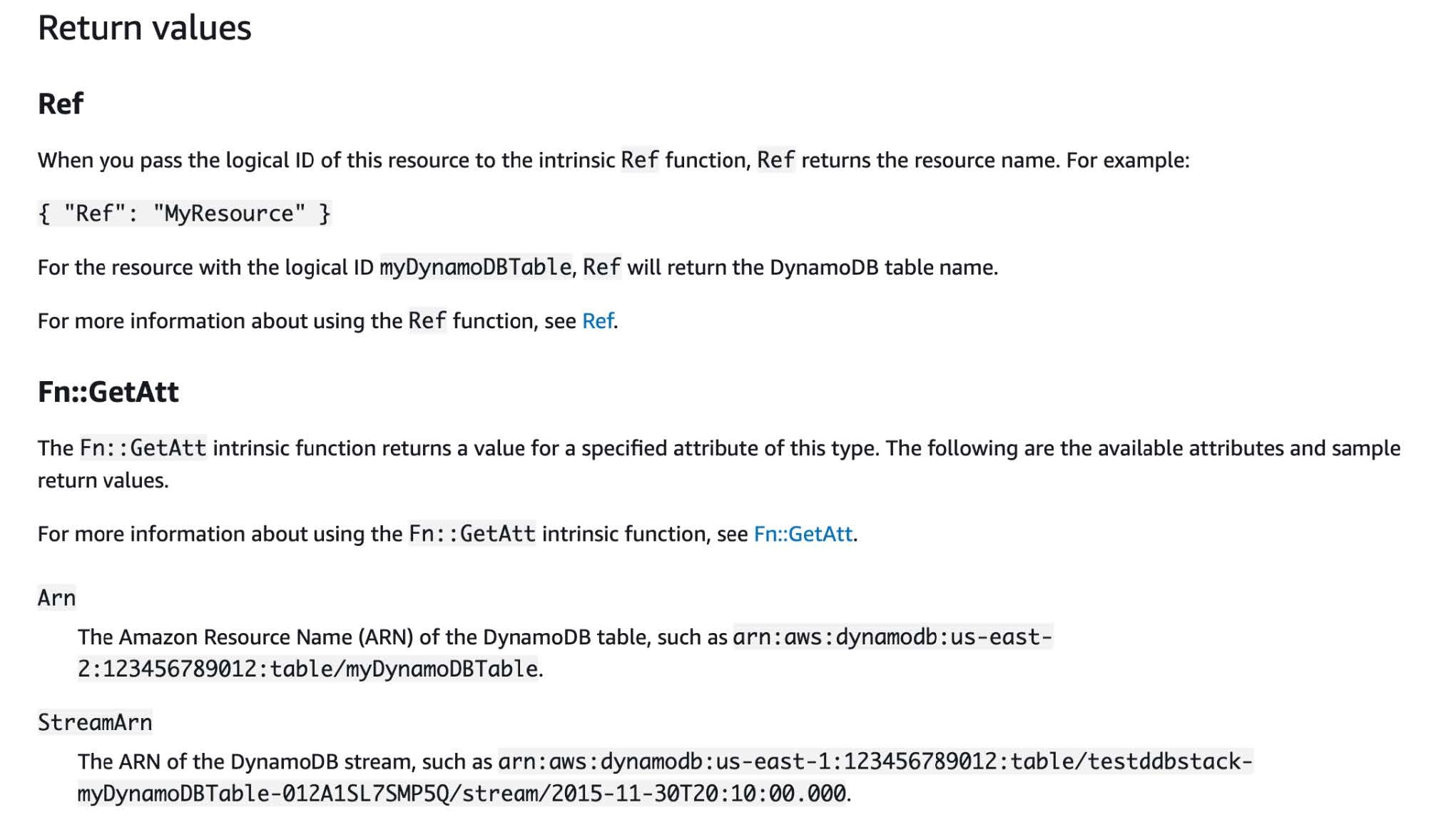
A full list of these functions with examples can be found in the AWS docs here. The two I’ve most commonly worked with are Ref and Fn::GetAtt, as they’re used to link resources together, like subnets to a VPC or security groups to an EC2 instance. However, it can sometimes be confusing to know if a property requires a value returned by Ref or Fn::GetAtt, such as a resource ARN. For some resources, it’s returned by Ref, while for others it’s returned by Fn::GetAtt. Using the AWS CloudFormation documentation is quite helpful here, as it provides a section detailing what information is returned by which function. Near the bottom of the webpage for each resource type is a section called “Return Values”, where you can see those values. For example, Ref returns the table name of a DynamoDB table resource, so you’d need to use Fn::GetAtt for the ARN, as shown below.
You can define a parameters section at the top of your template, which will appear when you upload your template to AWS so you can enter the values you’d like to be used by your resources. Parameters have been extremely useful to me whenever I’m uncertain what values should go into a property for a resource, or to provide greater flexibility for my template. One example is using parameters to provide a CIDR range to a security group rule.
```yaml
Parameters:
 SshCidr:
   Description: The CIDR IP for ssh access to the EC2 instance (e.g. 16.263.34.253/32)
   Type: String

Resources:
 WebServerSecurityGroup:
   Type: AWS::EC2::SecurityGroup
   Properties:
     GroupDescription: Enable HTTP ingress from ALB
     SecurityGroupIngress:
     - IpProtocol: tcp
       FromPort: 80
       ToPort: 80
       SourceSecurityGroupId:
         Fn::Select:
         - 0
         - Fn::GetAtt:
           - ApplicationLoadBalancer
           - SecurityGroups
     - IpProtocol: ssh
       FromPort: 22
       ToPort: 22
       CidrIp:
         Ref: SshCidr <-- Here is where the parameter is referenced
     VpcId:
       Ref: VpcId
```
This allows you to enter a broader range for a dev or test stack, then tighten that range to the appropriate values when deploying a production stack. Another example is when your template is interacting with resources that already exist in your AWS account and are not included in your template. If you need to pass in information from those resources, parameters are the way to go. Finally, AWS has a specific set of parameter types to help streamline and lock down your parameters. If all you need for one parameter is a subnet for your EC2 instance to run in, try the List<AWS::EC2::Subnet::Id> type. It not only locks the parameter to subnets but changes it into a dropdown list of all subnets for your region, which also saves you the headache of finding a specific subnet and saving its ID to enter manually.
When delving into a new resource you haven’t yet built in CloudFormation, the AWS CloudFormation docs can be a beast to deal with. Something that has helped me get up and running with new resources quickly is paying attention to the property info, provided in the description of each property under the “Properties” section of the AWS docs.
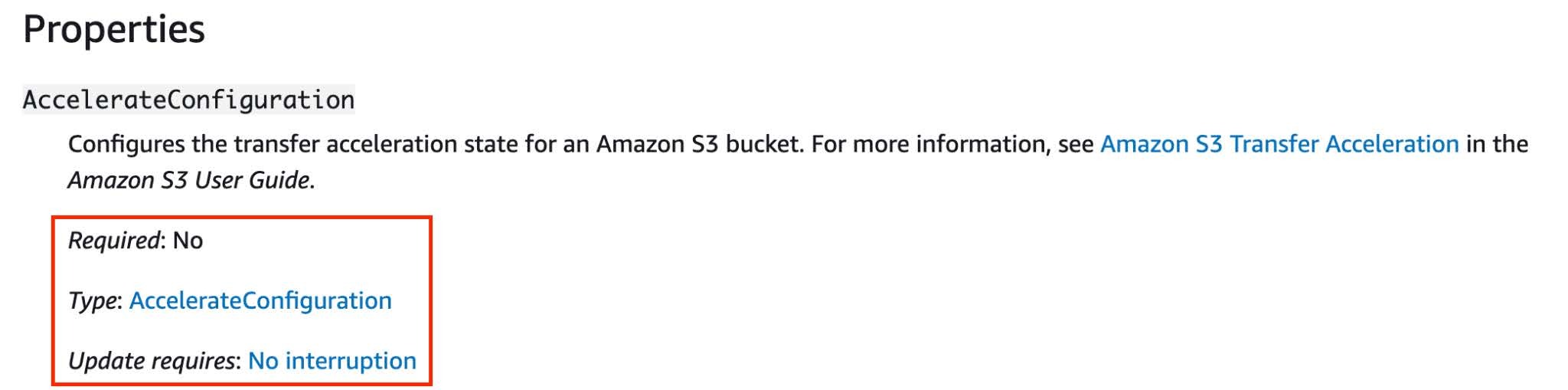
This will let you know the minimum properties required, whether a property is conditional on another, and how to structure more complicated properties. You may have noticed, as with the property above, that some don’t simply require a string or boolean, instead they accept an array or object of additional properties. The BucketEncryption property for an AWS::S3::Bucket resource looks like this, for example:
```yaml
Resources:
 S3Bucket:
   Type: AWS::S3::Bucket
   Properties:
     BucketEncryption:
       ServerSideEncryptionConfiguration:
         - BucketKeyEnabled: True/False
           ServerSideEncryptionByDefault:
             KMSMasterKeyId: String
             SSEAlgorithm: String
```
By following each of the Type links under that property’s description, you’ll find a webpage detailing the structure of the property. Personally, I wish they had it all laid out on the main resource webpage, but just remember that as you move on to the next webpage, the structure provided is contained within the previous property.
I hope you’ll find these tips as useful as I have, and soon you’ll be spinning up servers, databases, and VPCs all working together in harmony from a single file.
Founded in 2013, Trek10 helped organizations migrate to and maximize the value of AWS by designing, building, and supporting cloud-native workloads with deep technical expertise. In 2025, Trek10 joined Caylent, forming one of the most comprehensive AWS-only partners in the ecosystem, delivering end-to-end services across strategy, migration and modernization, product innovation, and managed services.
View Trek10's articlesCaylent Services
Reliably Operate and Optimize Your AWS Environment
Caylent Services
Quickly establish an AWS presence that meets technical security framework guidance by establishing automated guardrails that ensure your environments remain compliant.

Explore how Amazon Bedrock AgentCore’s latest capabilities shift the role of managed services providers needed to run agents reliably in production.
The reactive human-plus-tools model has hit its ceiling. Learn why world-class AWS agentic cloud operations require agents governed by domain experts.
Explore how Caylent and AWS are helping organizations move from AI experimentation to execution by combining agentic AI, modernization, and next-generation cloud operations to deliver faster, more secure, and more scalable business outcomes.
