 Trek10 Team
Caylent Services
Cloud Operations & Managed Services
Reliably Operate and Optimize Your AWS Environment
Learn how to build an IPv6-to-IPv4 proxy using CloudFront to enable connectivity with IPv4-only AWS services.
This blog was originally written and published by Trek10, which is now part of Caylent.
There's a few reasons you may want to adopt IPv6 in your workloads. A common one is having a VPC-bound AWS Lambda function that needs to communicate with the internet, but the subnets your Lambda function is associated with do not route to a NAT Gateway. This is an issue because the Elastic Network Interfaces the Lambda service creates do not have an associated public IPv4 address, so they can't make their own internet-bound requests through the internet gateway. With IPv6 however, your Lambda function's network interfaces do receive a public IPv6 address, so your Lambda functions can communicate with the internet over IPv6 via an internet gateway or an egress-only internet gateway.
Another big reason to adopt IPv6 is that AWS has started to charge for public IPv4 addresses. That was announced in 2023, and that charge went into effect in February of 2024. This can be especially frustrating since at the time they started charging for IPv4 addresses, 88% of AWS service endpoints didn't support IPv6 at all. At the time of this writing, it's gotten a lot better (down to 58% of services that don’t support IPv6), but there's still a long way to go with popular services like Amazon DynamoDB still not supporting it.
It can be pretty frustrating if you're trying to adopt IPv6 in your workloads but the AWS service you need to call doesn't have an IPv6-enabled endpoint. Luckily, there's a way to work around this limitation for most services.
Amazon CloudFront, while typically meant to be a CDN for cached assets, can also be used as a generic HTTP proxy. You can use a custom origin to route requests to any HTTP endpoint, and CloudFront will handle the request and response. CloudFront distributions can be called over IPv6, and they can make requests to your origin over IPv4. So you can create a CloudFront distribution, use the regional DynamoDB endpoint as the origin, and have your workload call the CloudFront distribution over IPv6. This is a pretty simple pattern, but there are some caveats you should know about.
CachePolicyId
Be sure to configure the default cache behavior with the CachingDisabled cache policy. Without this, you may be caching requests that need to actually hit the AWS service.
AllowedMethods
You'll also need to support all HTTP methods in the AllowedMethods property. Some AWS API calls might be done over HTTP methods other than GET or HEAD, so your proxy must support those.
OriginRequestPolicyId
You'll need to specify the AllViewer origin request policy. Otherwise, as a request travels from caller to distribution, to origin, the CloudFront distribution will strip the Host header, replacing it with the domain of the origin. This default behavior will cause issues with AWS SigV4 though, as the host header is part of the signature, so a mismatched host header will cause signature verification to fail. The caller that signs the request will specify the Host header as the domain of your proxy, not the actual service endpoint itself. By specifying the AllViewer origin request policy, CloudFront will pass the Host header from the viewer request to the origin request, which will allow the signature verification to pass.
Once that's deployed, you'll have a proxy! You can call the CloudFront distribution from your workload:
$ aws dynamodb list-tables --endpoint-url https://myipv6proxy.com
{
    "TableNames": [\
        "my-dynamodb-table"\
    ]
}Now let's say you want to communicate with multiple IPv4-only services and you don't want to create a separate proxy per service. Luckily, in November of 2024, AWS announced support for origin modification within CloudFront Functions. We can use a CloudFront Function to inspect the request, determine where the request needs to hit, and set the origin to it. Some services might allow you to derive the host from the signature, but a simple approach might be to use a subdomain.
You can configure a CloudFront distribution with multiple alternate domain names, and those can include wildcards. So we could configure our proxy with both myipv6proxy and *.myipv6proxy, so as long as we have our certificate and DNS configured for the same wildcard, we could hit our proxy via foo.myipv6proxy.com. In this case, we can use the entire subdomain to derive the host header. We'll need a way to escape periods though, since periods are not allowed in subdomains. We can use -- to represent a period, so google--com.myipv6proxy.com would instruct the CloudFront Function to set the origin to google.com. Or more helpfully, dynamodb--us-west-2--amazonaws--com.myipv6proxy.com would set the origin to dynamodb.us-west-2.amazonaws.com.
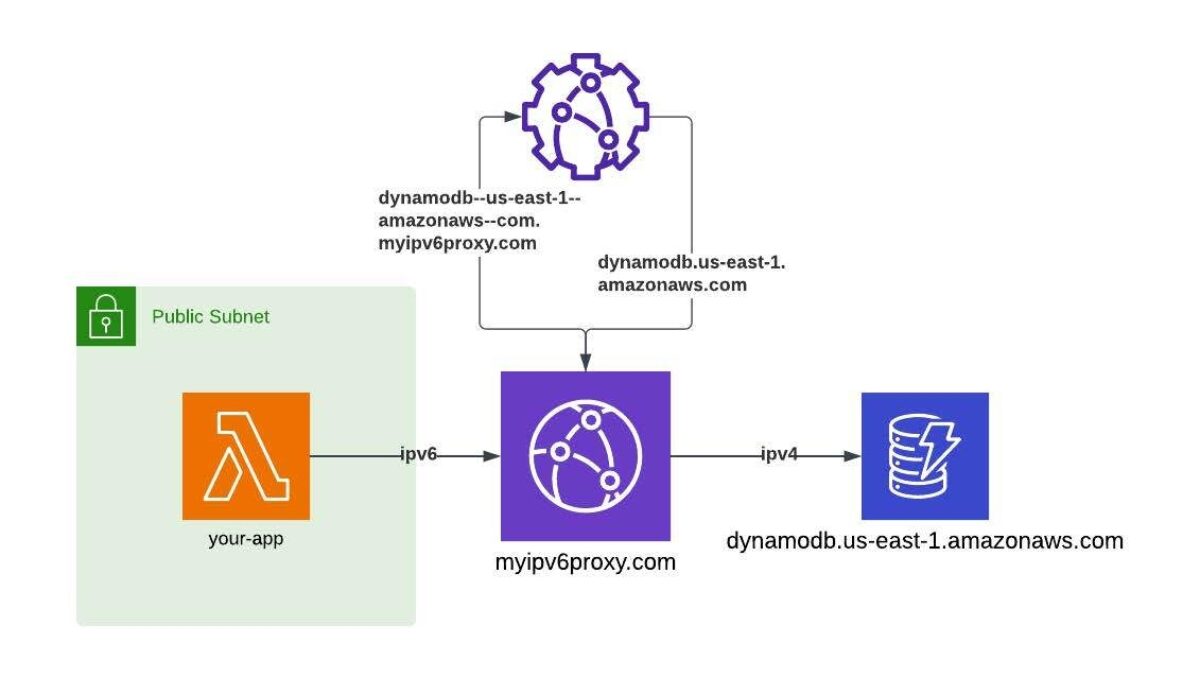
I can't guarantee that every service will support this workaround, but the popular ones I've worked with do support it, including DynamoDB, ECS, and SQS.
Before you use this approach, you should carefully consider that each request and response can be logged through CloudFront logging. It's best to ensure that appropriate measures are taken to secure your CloudFront distribution, log only necessary information, and keep your log destinations secure.
You could further secure the proxy by associating a WAF with the distribution. You can also implement additional checks within the CloudFront Function to prevent targeting non-AWS origins, or include an allow-list of origins that you explicitly approve.
You should also consider how this will impact your workload costs. Each request made through the proxy will incur data transfer fees and per-request fees. If your motivation for using IPv6 is to avoid public IPv4 address charges, you should ensure that the request and data transfer fees are less than the cost of the public IPv4 address. The dynamic origin routing approach may also incur additional costs, as CloudFront Functions are billed per invocation.
Additionally, you should consider the latency impact of routing your requests through CloudFront. If your workload is latency-sensitive, you may want to consider other options for proxying IPv6 requests or stick with IPv4 until AWS improves IPv6 support.
Founded in 2013, Trek10 helped organizations migrate to and maximize the value of AWS by designing, building, and supporting cloud-native workloads with deep technical expertise. In 2025, Trek10 joined Caylent, forming one of the most comprehensive AWS-only partners in the ecosystem, delivering end-to-end services across strategy, migration and modernization, product innovation, and managed services.
View Trek10's articles
Explore how Amazon Bedrock AgentCore’s latest capabilities shift the role of managed services providers needed to run agents reliably in production.
The reactive human-plus-tools model has hit its ceiling. Learn why world-class AWS agentic cloud operations require agents governed by domain experts.
Explore how Caylent and AWS are helping organizations move from AI experimentation to execution by combining agentic AI, modernization, and next-generation cloud operations to deliver faster, more secure, and more scalable business outcomes.
