 Melissa Leide
Caylent Services
Product Strategy and Experience
Define product direction, design trusted experiences, and deliver AI-enabled products built for adoption, scale, and measurable outcomes.
Learn why 85% of AI projects fail and how strategic UX design drives trust, adoption, and measurable ROI.
AI isn't failing because the technology is weak. More often, it fails when humans can’t effectively interact with it. This adoption gap is why AI investments stall before delivering returns, and why AI UX strategy has become critical for success.
In this blog, we’ll explore why UX strategy shapes whether AI initiatives scale or stall, what happens when it’s ignored, and how to design AI experiences that drive trust, adoption, and measurable business impact.
Teams invest heavily in models, data pipelines, and infrastructure, only to see adoption stall once the product reaches real users. This isn’t necessarily because the AI is wrong, but because the experience is unclear or untrustworthy. When that happens, value leaks out long before an initiative ever reaches scale.
This is why so many AI projects fail to deliver ROI. Gartner estimates that up to 85% of AI initiatives fail to deliver business value, and the root cause is rarely technical. People won’t use systems they don’t understand or trust, and even the smartest AI falls flat if users aren’t confident using it.
When users misinterpret an AI recommendation or don't know how much to trust it, the consequences extend far beyond churn. Adoption stalls for predictable reasons:
For example, in energy management, when building operators receive AI recommendations to adjust HVAC settings but can't see whether those suggestions are based on occupancy patterns, weather forecasts, or equipment performance, they often ignore the AI entirely. Confusion alone is often enough to cause users to abandon a feature entirely, undercutting the efficiency AI was meant to provide.
AI UX strategy brings structure to this moment. It clarifies what the AI is doing, what assumptions are in play, and what action is expected next. When the handoff is intentional, such as clearly signaling confidence, surfacing the reasoning behind a recommendation, and outlining a concrete next step, the experience feels supportive rather than opaque. Users stay engaged rather than second-guessing the output or resorting to manual workarounds.
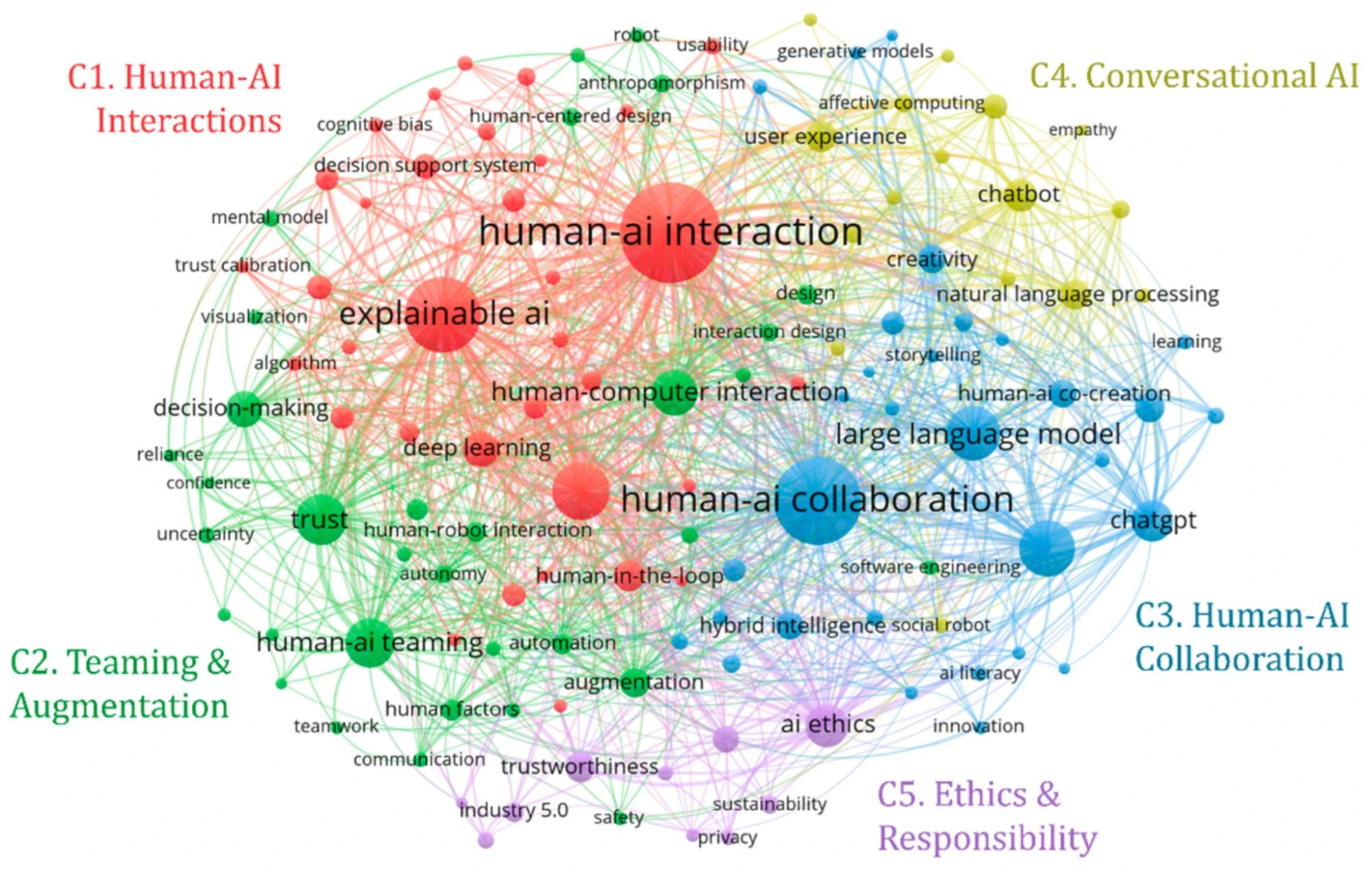
Key concepts in AI UX: trust, explainability, and human-centered design form the foundation of successful human-AI collaboration
When an AI UX strategy is treated as an afterthought, common patterns emerge quickly. AI features default to generic chat interfaces, even when other interaction models would be more effective. Onboarding leaves users uncertain about how the system fits into their work. Outputs lack context, and users have no clear way to intervene or course-correct. Strategic AI UX, by contrast, gives users clarity and control:
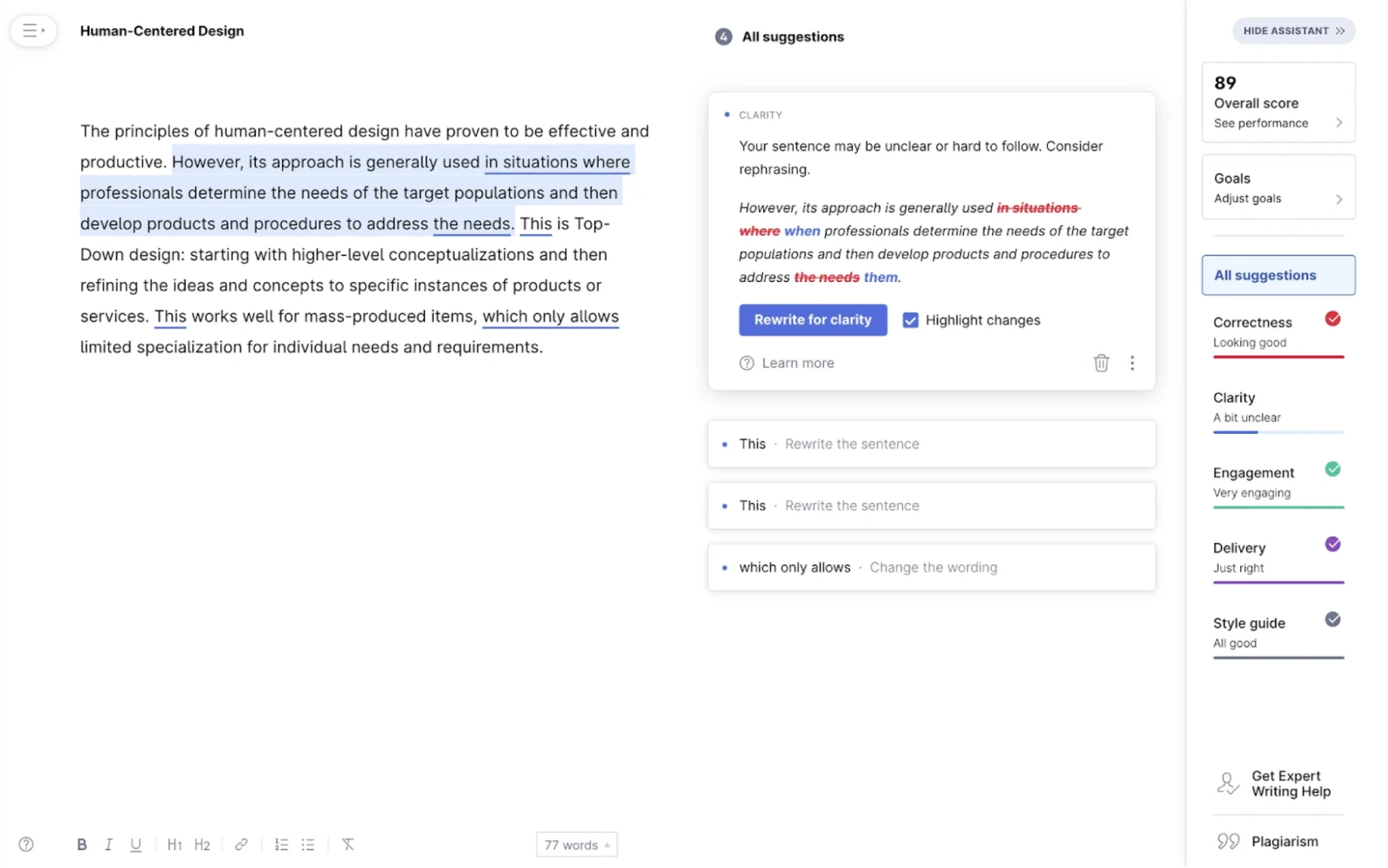
Grammarly's AI rewrite feature provides clear options, user control, and transparent tone adjustments — strategic UX that builds trust
Over time, engagement drops, features get sidelined, and internal confidence in AI initiatives weakens. MIT research shows that 95% of enterprise AI pilots fail to deliver measurable returns, often because user adoption stalls before the technical value is proven. The cost isn’t limited to a single product; it affects momentum, credibility, and long-term capacity for innovation.
An effective AI UX strategy focuses on helping people make confident decisions in complex, uncertain, and unpredictable environments. AI systems often introduce ambiguity by default. Unlike traditional software that follows deterministic rules, AI outputs are probabilistic; they can vary, be partially correct, or shift over time as models update. When users encounter that kind of uncertainty without context, they lose trust in the system, and that ambiguity can kill adoption. How that ambiguity is surfaced and managed, however, determines whether users feel empowered or overwhelmed.
A strong AI UX strategy typically focuses on a few core principles:
For example, a generative AI tool used for content planning works best when users can see which sources or assumptions informed the output, edit directly, and regenerate results with updated context. That transparency transforms AI from a black box into a collaborative partner, one that fits naturally into existing workflows.
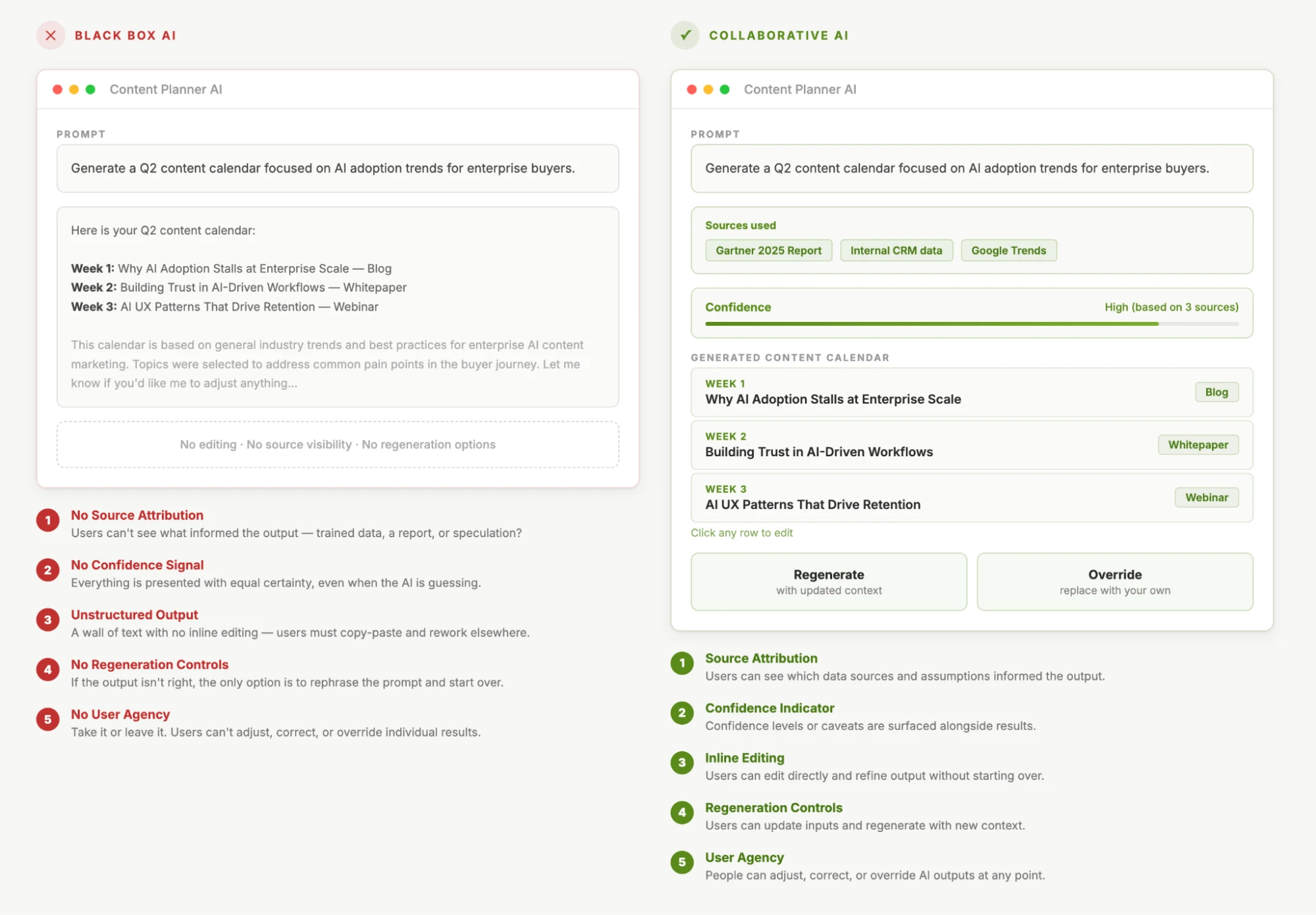
AI UX strategy plays a direct role in how quickly AI delivers value. When done well, it creates measurable business impact across four key areas.
The most successful systems don’t force humans to adapt to machines; they support how people already think and work.
When Symmons partnered with Caylent to enhance their Evolution® water management platform, the challenge was not only to make the AI smarter but also to make it usable.
Facility teams were receiving sensor data and alerts but lacked clear guidance on what the data meant or how to act on it. Understanding the anomalies required technical expertise and ate up valuable time.
We helped integrate AI-driven anomaly detection and Generative AI into Symmons’ Evolution® platform, enabling automated detection and proactive management of water usage issues. The redesigned dashboard surfaces AI-driven insights with prescriptive recommendations, showing facility engineers not just what's happening, but why it matters and what action to take. Critical issues are prioritized automatically, and users receive step-by-step guidance for resolution.
The impact was immediate:
The AI models didn't change, but the interface that made them trustworthy and actionable did.

Research reinforces this connection. A study in npj Digital Medicine found explainable AI reduced diagnostic error from 23.5 to 14.3 days, proving a 39% improvement from better UX, not better models.
At the business level, these improvements show up as faster ROI realization, fewer support escalations, and stronger product-market fit. UX strategy helps ensure AI investments scale sustainably rather than stall after initial deployment.
Great AI UX should be measurable. The most successful AI teams track specific metrics to validate their UX decisions and should be able to tell whether their strategy is working, not just intuitively, but quantitatively. Whether you're early in your AI journey or refining an existing feature, here's how to measure if your UX strategy is actually moving the needle:
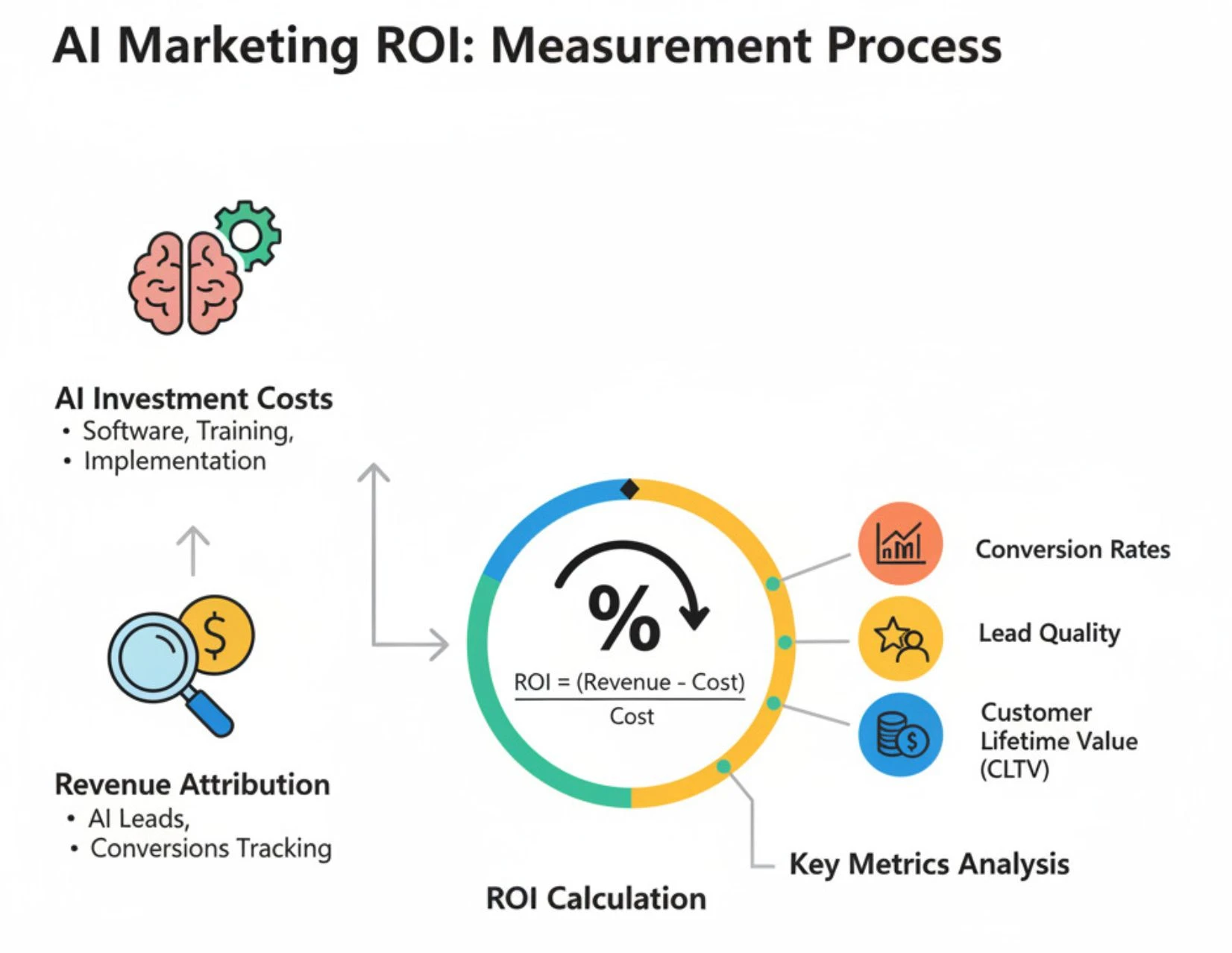
Track trust, adoption, and business impact to validate whether your strategy is working | via CI Web Group
Tip: Lower override rates and better recovery options are early indicators of trust.
Tip: Think beyond clicks and measure how effectively users move through AI-assisted workflows.
When these signals move in the right direction, it’s a strong indicator that your AI user experience strategy is doing its job of de-risking the investment and accelerating ROI.
You can have the most advanced model in the world, but if it doesn’t connect with the human on the other side of the screen, it won’t deliver meaningful value. An effective AI UX strategy is the bridge between AI capability and human success. It’s the difference between adoption and abandonment and between experimentation and impact.
At Caylent, we help teams design AI-powered products that succeed in real-world use. Our focus extends beyond technical capability to include how people experience, trust, and rely on AI in their day-to-day work.
Whether teams are deploying generative AI through Amazon Bedrock or training models in Amazon SageMaker AI, we treat UX strategy as a core part of delivery. Our approach is rooted in human-centered strategy and business alignment:
Building AI is only half the story. Designing how humans interact with it is how real value is unlocked. If you’re ready to make your AI usable, trusted, and valuable at scale, get in touch with our experts today. Caylent helps teams design the human-AI experiences that turn potential into progress.

Melissa Leide is a Senior Design Leader at Caylent, specializing in UX strategy, human-centered design, and emerging technologies like generative AI and voice interfaces. She helps clients transform complex challenges into intuitive experiences that drive engagement and business value. Based in Denver, Melissa spends her free time hiking Colorado's trails and hunting for vintage treasures.
View Melissa's articlesCaylent Services
Define product direction, design trusted experiences, and deliver AI-enabled products built for adoption, scale, and measurable outcomes.
Caylent Catalysts™
Accelerate investment and mitigate risk when developing generative AI solutions.
Leveraging our accelerators and technical experience
Browse GenAI Offerings
AWS will end support for Amazon Pinpoint on October 30, 2026. Learn what's going away and what's surviving, what your migration options are, and how to quickly audit your environment to see your exposure.

Chatbots aren’t the only way to surface AI, and often, they’re the wrong choice. Discover intelligent interface patterns that drive AI adoption, build user trust, and deliver measurable ROI without forcing users to craft the perfect prompt.

Learn what becoming a SaaS company requires across product, architecture, go-to-market, support, and culture.
